








 Contact Platform Support
 Help Center
2017 Wireless Smart Dmx512 Transmitter and Receiver Rail Light Controller




Related Products
-
 2016 New Huge Capacity Dmx 512 Rail Switch Light ControllerUS$ 43.7 - 50MOQ: 1 Piece
 -
Professional Cheap DMX Controller With High QualityUS$ 400 - 401MOQ: 1 Piece
-
Manufacturer Supplier Lighting DMX Controller With Long-term ServiceUS$ 400 - 401MOQ: 1 Piece
-
Factory Supplier DMX512 RGB Led Panel Driver With Long Service LifeUS$ 400 - 401MOQ: 1 Piece
-
Manufacturer Supplier Addressable DMX Decoder With Long-term ServiceUS$ 400 - 401MOQ: 1 Piece
System structure
Summarize of the system
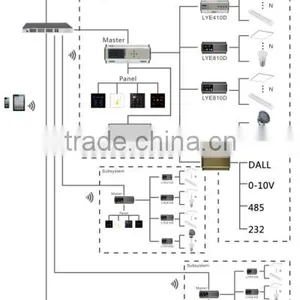
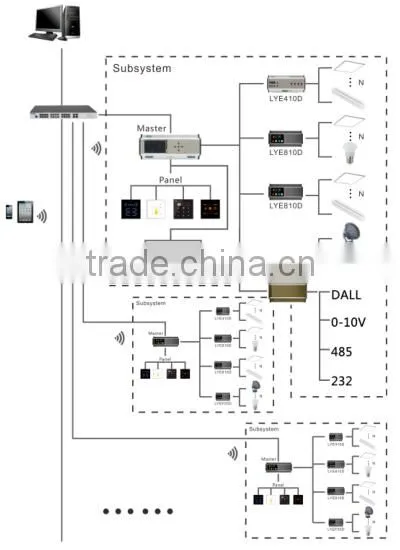
General control system is a kind of intelligent control system that corresponds with the indoor and outdoor scene lighting control ,like hotel lighting and building lighting control. The whole design scheme is based on operation humanized and personalized principle. The system can control all the lighting system by computer network, monitor the current operating state of each lighting subsystems, achieve linkage control with DALI system, DMX system, multimedia central control system,485 bus and TCP/IP. At the same time it can be extended to the intelligent control of the entire home or commercial systems.
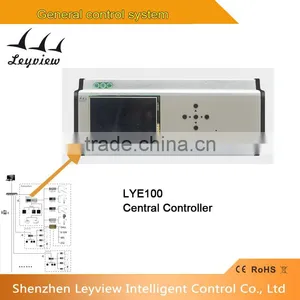
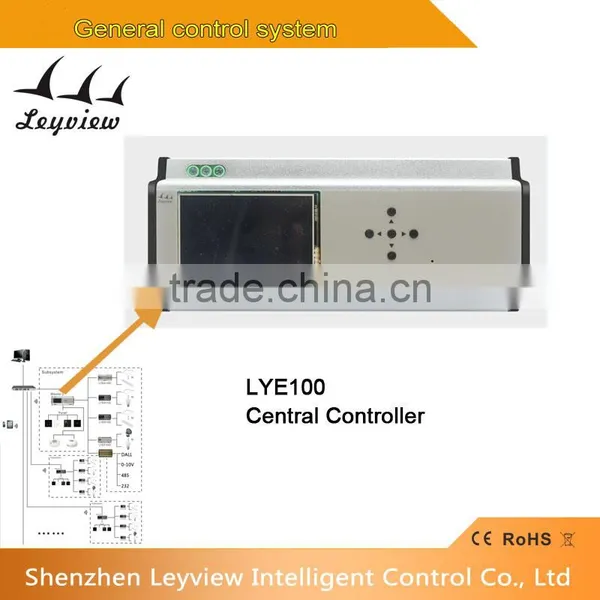
Product name:Centralized Manager for dmx 512
Model No.: LYE100
1. Summarize of the product
This product through EDX interface connected to the scene panel, through DMX - 512 interface and DMX dimmer or switch controller connection, network interface provides remote online and setting function.
A, Output DMX 512 signals, can control 512 circuit, and throuth DMX OUT monitoring function to test circuit state.
B, Can set up model of guest rooms and public space/can set the password protection function.
C, Can match ECP series control panel.
D, Can store 896 set of scenarios, each group can control 512 circuit scene.
E, Can set if receive DMX signals.
F, Can be set 128 areas,suitable for all the kinds of places.
G, Can beused to match figure control software.
2.Technical Parameters
| Working voltage | AC90-260V |
| Working temperature | -20-60 degree |
| Working consumption | Min5.7w-Max6.4w |
| Display resolution | 400*240 |
| Control mode | resistive touch and buttons |
| Input | EDX signal |
| Output | DMX512 channels |
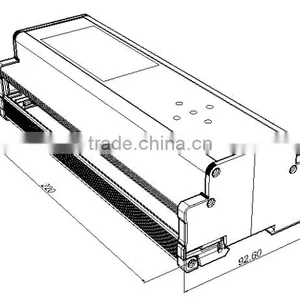
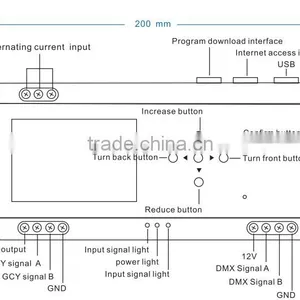
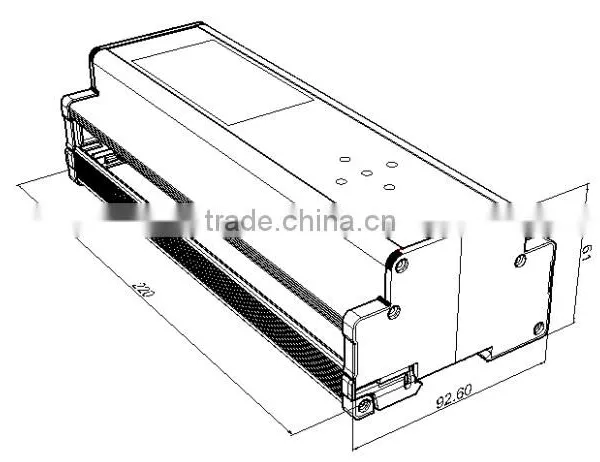
3. External dimension
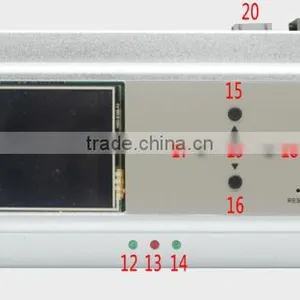
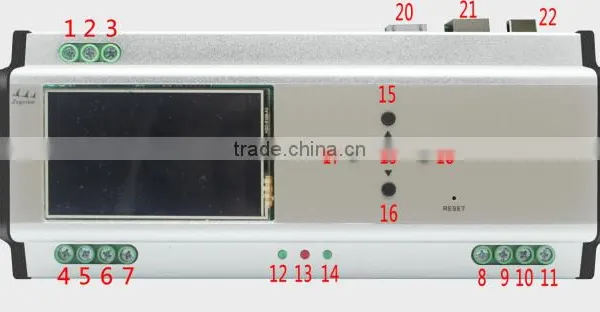
4. Interface specifications
1) The alternating current input
2) The alternating current input
3) The alternating current input
4) 12V power output
5) EDX signal A
6) EDX signal B
7) GND
8) 12V
9) DMX signal A
10) DMX signal B
11) GND
12) Input signal light
13) Power light
14) Input signal light
15) Increase button
16) Reduce button
17) Turn back button
18) Turn front button
19) Confirm button
20) Program download interface
21) Internet access Interface
22) USB
5. Use instruction
5.1 The host interface Operating instructions
1) System time
2) Currently running area number
3) The current operation area is the scene
4) Select function button
5.2 Mode scene
Operation instructions
Touch function key to enter MODE scene, please refer to previous picture for the
following operating.
Touch “Call scene”, enter the regional scenarios scene.
Touch “Scene”, enter the scene configuration screen, configuration corresponding to
the CP, SC of fades DMX512 , fading time, scene model.
Touch “DMXOUT”, enter the interface of view the DMX512 current output
Touch “Calendar”, enter the date of the timer interface, Configure the timer
Touch “Astro”, enter the astro of the timer interface, Configure the timer
Touch “Timer”, enter the timer switch interface
Touch “Clock”, enter the system clock interface
Touch “Patch”, enter the system patch interface
Touch “Address”, enter setting IP address interface.
Touch “Password”, enter setting password interface
5.3 Call scene
Under the MODE interface touch “Call scene “into the selected regional scene
interface , you can make the user to configure each scenario
CP:display area, SC:display the selected scenario
On the left,as picture 1,“regional selection area”,Through touch or up/down button to
select, the selected area display on “CP” position.
On the right,as picture 2, “scene selection area”, Through touch to select scene, the
selected scene display “SC”position.
On the down,as picture 3,setting back function scene.
5.4 Scene Operation instruction
1 ) Under the MODE interface touch “scene “into the selected scene interface.
2 ) Display the current selected area, through up/down key to select the area
3 ) Display the current selected scene, through up/down key to select the scene
4 ) Display the current selected fading time, through up/down key to select the time
5 ) Display the current scene mode, SW, SC two kinds
6 ) The current channel number:0-100 or NC, can slide to adjust
7 ) Touch to turn paper, also can through right/left key
8 ) Touch to turn paper, also can through right/left key
9 ) Back function scene.
10 ) Confirm to store the scene data.
5.5 DMXOUT SCENE
1) Under the MODE interface touch “DMXOUT” into scene, check current 512 output
number
2) Initial channel coding
3) The output number of the corresponding channel
4) Turn-back, also through right/left key to turn
5) Turn-front, also through right/left key to turn
6) Back function scene
5.6 Calendar Scene
Under the MODE interface touch “Calendar” into scene .As the picture, dispaly
“ADD”AND “EDIT”
Touch ADD into the following scene.
6.Assembly method
Established in 2005, we are professional maufacturer in the research, development and production of intelligent controller,switch,dimmer for lighting system.
1.We are located in Baoan district, Shenzhen City,China,closed to the shenzhen airport,convenient for the visit !
2. Years menber of Alibaba
3. Products are approved with CE,RoHs,Fcc,SAA,UL ,ETL certificate.
4.Every year we attend the Guangzhou optical sub Exhibition
We adheres to "convenient, efficient, intelligent" which guarentees products quality and customer service. Intelligent integrated into life, make life more convenient.
This information was Verified by SGS Group and is valid for the following period: 2016/01/28 --- 2017/01/27
The competitive advantage of product line:
1, Our company is committed to the researching& development, manufacturing and marketing of Lighting control system and the accessories for the systems,like the lighting touch switch,controller,dimmer,sensor and so on. We have strong R&D team which ensures the high quality of the system and accessories.
2,All of our items have years quality warranty. Offering the customer best services prior or after sale
3,Samples shippment can be settled 1-3 days after ordering and payment.
4, OEM welcomed!!
Question 1: Are you a factory or a trading company?
Answer: We are a factory.
Question 2: What's the main business of Leyview?
Answer: Leyview committed to the development and production of control system, to provide professional lighting control systems and solutions.
Question 3: What' s the main products of Leyview?
Answer: We focused on streetlight lighting control system(Zigbee/PLC/RS-485), general control system(DMX) and commercial lighting control system(DALI).
Question 4: What Leyview will do if we have problems after receiving your products?
Answer: Our products have been strictly inspected before shipping. Once you receive the products you are not satisfied, please feel free to contact us in time, we will do our best to solve any of your problems with our good after-sale service.
Question 5: How about your sales model?
Answer: We establish the brand as the foundation, with the constant expansion of the brand influence, distributors will replace the ordinary sales model of the market as our main sales
Tel: 0086-755-29686602
Fax: 0086-755-29681865
Address: 2/F,2 Building,East side,Dacheng Industrial Zone,No.124,Zhoushi Road,Shiyan Street,Bao’an District,Shenzhen,Guangdong,China.

Send Inquiry to This Supplier

You May Also Like
-
Dimmer SwitchUS$ 2 - 5MOQ: 20 Pieces
-
Led Light RF-MINI DimmerUS$ 2 - 2.8MOQ: 10 Pieces
-
High Quality DMX Controller 240 Disco10w Stage Lighting ControllerUS$ 63 - 100MOQ: 1 Piece
-
Dimmer ModulesNegotiableMOQ: 1
-
192Channel DMX512 LED Controller Console for Led Stage LightUS$ 10 - 30MOQ: 1 Piece
-
Electrical Switches Light DimmerNegotiableMOQ: 500 Pieces
-
Touch Screen Incandescence Lamp Micro Dimmer SwitchUS$ 30 - 50MOQ: 1 Piece
-
RF 2.4G 4 Channel LED Remote(Remote A)NegotiableMOQ: 1 Piece
-
DJ Light, DMX Console, 768 Channel DMX ControllerNegotiableMOQ: 2 Pieces
-
Wuxi Factory Workshop Lighting Retrofit Energy-saving Device Sjdz-0.38-50 Sjdz-0.38-100US$ 152.31 - 153.69MOQ: 1 Piece


