








 Contact Platform Support
 Help Center
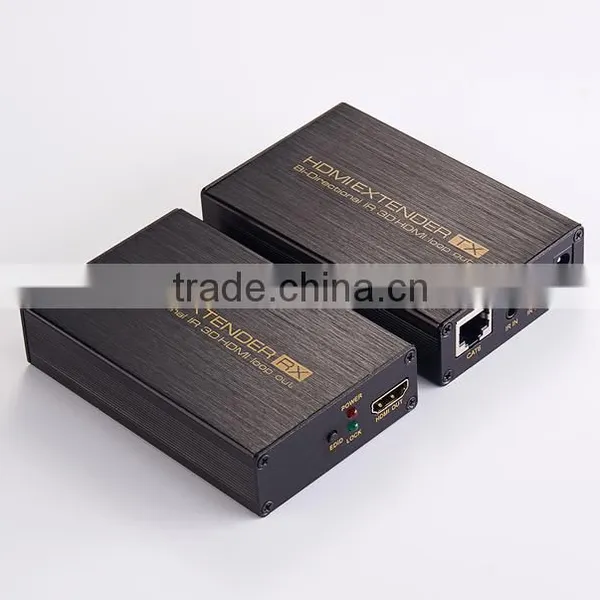
Hot Selling VOXLINK HDMI Extender Over Single 60m/200ft UTP Cables With Dual IR Control EU


Related Products
-
 Best Selling Hot Sales Voxlink HDMI 2.0\HDR 1x2 HDMI Splitter (4K/60Hz/ HDCP2.2) PSEUS$ 24.5 - 26MOQ: 5 Pieces
 -
High Speed Good Quality Black Voxlink HDMI 2.0\HDR 1x2 HDMI Splitter (4K/60Hz/ HDCP2.2) AUUS$ 24.5 - 26MOQ: 5 Pieces
-
Hot- Selling New Arrival Voxlink HDMI 2.0\HDR 1x2 HDMI Splitter (4K/60Hz/ HDCP2.2) UKUS$ 24.5 - 26MOQ: 5 Pieces
-
Voxlink HDMI 2.0\HDR 1x2 HDMI Splitter (4K/60Hz/ HDCP2.2)USUS$ 24.5 - 26MOQ: 10 Pieces
-
New Arrival VOXLINK Black 2.0 4*1 4K 60HZ HDMI Switcher USUS$ 46.2 - 48MOQ: 10 Pieces
Hot Selling VOXLINK HDMI Extender over single 60m/200ft UTP Cables with Dual IR Control EU
Thank you for purchasing this product. For optimum performance and safety, please read these instructions carefully before connecting, operating or adjusting this product. Please keep this manual for future reference.
INTRODUCTION
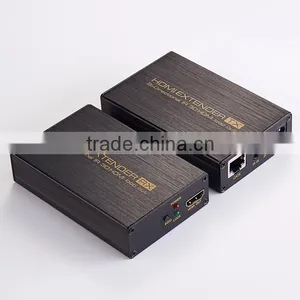
The HDMI Extender over Single Cat5e/6 with Bi-directional IR extends high definition video and audio signals and IR, at a distance of up to 200ft/60m over a single Cat5e/6 cable. Also, it can distribute a HDMI signal to local HDMI output port. Features EDID management, which allows and encourages source and display “handshake” for seamless integration. With only one cost effective Cat5e/6 cable, high definition sources with HDMI outputs can be connected to high definition displays with HDMI inputs over long distances. Deep color video, DTS-HD or Dolby TrueHD audio is supported and compatible with the extender. In addition, the extender is also equipped with bi-directional IR pass-through which allows for source or display control.
The extender includes two units: transmitting unit and receiving unit. The transmitting unit is used to capture the HDMI input with IR signals and carries the signals via one cost effective Cat5e/6 cable. The receiving unit is responsible for equalizing the transmitted HDMI signal and reconstructing IR and serial control signals. The extender offers the most convenient solution for HDMI extension over a single Cat5e/6 with long distance capability, and is the perfect solution for any application.
FEATURES
<!--[if !supportLists]-->Ø <!--[endif]-->Allows HDMI Audio/Video and IR signals to be transmitted over a single Cat5e/6 cable
<!--[if !supportLists]-->Ø <!--[endif]-->Distribute a HDMI signal to local HDMI output port
<!--[if !supportLists]-->Ø <!--[endif]-->Bi-directional IR system allowing for control of source or display (IR accessories included)
<!--[if !supportLists]-->Ø <!--[endif]-->Smart EDID management
<!--[if !supportLists]-->Ø <!--[endif]-->Transmission Range: Extends 1080p resolution up to 200ft/60m over a single Cat5e or Cat6 cable
<!--[if !supportLists]-->Ø <!--[endif]-->Works with HDMI and HDCP compliant devices
<!--[if !supportLists]-->Ø <!--[endif]-->Supports up to 1080p High Definition resolution
<!--[if !supportLists]-->Ø <!--[endif]-->Compact design for an easy and flexible installation
SPECIFICATIONS
Video Bandwidth: Single-link 165Mhz [ 4.95Gbps]
Video Support: 480i/480p/720p/1080i/1080p @60Hz
Audio Support: Surround Sound (up to 7.1 ch) or stereo digital audio
Transmission Range: HD [1080p 24-bit color] – up to 60m [200ft]
Input TMDS Signal: 3.3 volts
Input DDC Signal: 5.0 volts/P-P
ESD Protection: Human Body model:+/- 8 kV (air-gap discharge)
+/- 4 kV (contact discharge)
PCB stack-up: 4 layouts
HDMI connector: Type A 19 pin female
RJ-45 connector: WE/SS 8P8C
3.5mm connector: (TX and RX) IR Receiver/IR Blaster
MECHANICAL SPECS
Housing: Metal enclosure
Power Supply: 5V1A DC
Power consumption: 2.5 watts (TX); 1.2 watts (RX)
Operation temperature: 32~104 °F
Storage temperature: -4 ~140 °F
Relative humidity: 20~90 % RH (no condensation)
Package Contents:
HDMI Transmitter --------------------------------------------1pcs
HDMI Receiver------------------------------------------------1pcs
Windband IR Tx cable --------------------------------------- 1pcs
windband IR Rx cable --------------------------------------- 1pcs
5V1A DC Power Supply Adaptor ------------------------- 2 Pcs
Product Manual -----------------------------------------------1pcs
PANEL DESCRIPTIONS
Transmitting unit
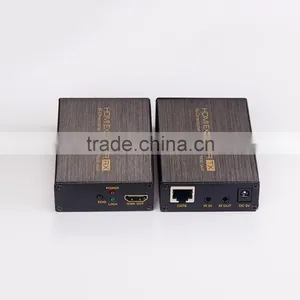
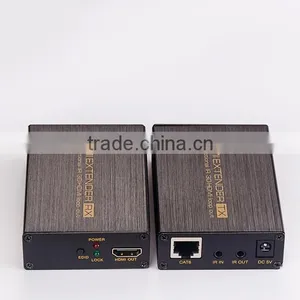
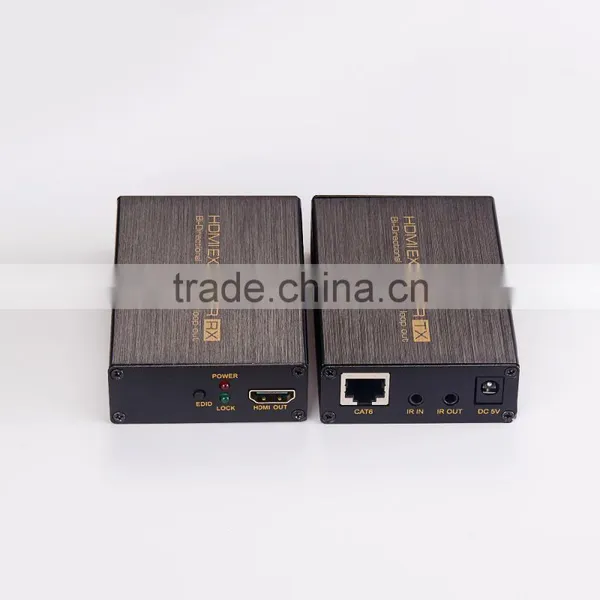
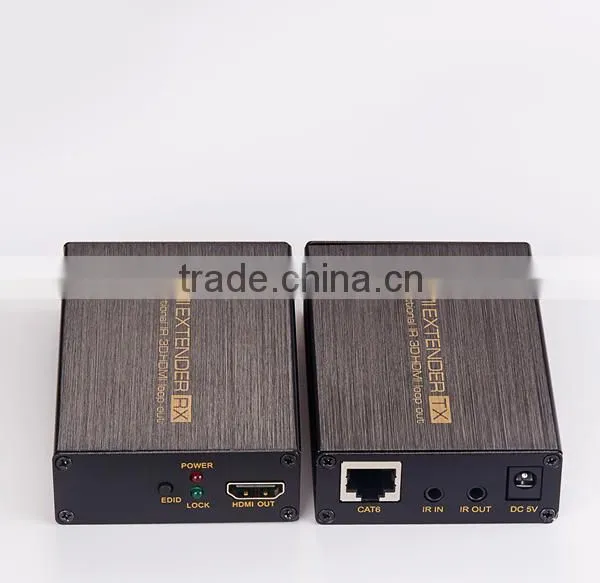
1. HDMI OUT: This slot is where you connect the HDMI input port of your sink equipment such as HDMI displayer or HDTV set.
2. EDID: The Extender can copy default EDID or TV EDID from the local HDMI output port to HDMI source.
3. IN LED: This LED will work while this device received HDMI signal from HDMI source.
4. HDMI IN: This slot is where you connect the HDMI output port of your source equipment such as DVD/Blu-ray players or Set-Top-Box with an HDMI cable.
5. Power LED: This LED will work when the device is connected with power supply.
6. CAT6: Connect the CAT output of the transmitter with the CAT input of the receiver with CAT5E/6 cable.
7. IR IN: Connect to the IR Receiver for IR signal reception. Ensure that remote being used is within the direct line-of-sight of the IR receiver
8. IR OUT: Connect the IR Blaster cable included in the package for IR signal transmission. Pace the IR blaster in direct line-of-sight of the equipment to be controlled
9. DC 5V: Connect from 5V DC power supply into the unit and connect the adaptor to an AC outlet.
Receiver unit
10. EDID: The Extender can copy default EDID or TV EDID from the HDMI output port to HDMI source.
11. LOCK LED: This LED will illuminate when the HDMI signal from the transmitter is stable.
12. HDMI OUT: This slot is to connect the HDMI input port of your display such as an HDTV.
13. Power LED: This LED will work when the device is connected with power supply.
14. CAT6:Connect the CAT input of the receiver with the CAT output of the transmitter with CAT5E/6 cable.
15. IR IN: Connect to the IR Receiver for IR signal reception. Ensure that remote being used is within the direct line-of-sight of the IR receiver.
16. IR OUT: Connect the IR Blaster cable included in the package for IR signal transmission. Pace the IR blaster in direct line-of-sight of the equipment to be controlled.
17. DC 5V: Connect from 5V DC power supply into the unit and connect the adaptor to an AC outlet.
CONNECTION DIAGRAM
1. Connect a source such as a Blu-Ray Player, game console, A/V Receiver, Cable or Satellite Receiver, etc. to the HDMI input on the Transmitting unit.
2. Connect a display such as an HDTV or HD Projector to the HDMI output on the Receiving unit.
3. Connect a single Category 5e/6 up to 200ft/60m to the output of the Transmitting unit, and the other end to the input of the Receiving unit.
4. For power, plug both the Transmitting unit and Receiving unit with the included power supplies.
5. Power on each device in the same sequence (receiver and transmitter will already be powered when either unit is plugged in.)
At this point the display connected should display the source signal connected to the extender set. If no signal is being displayed, check the receiver EQ swithcer(LOW for 0-20m cat6 cable ,HIGH for 20-50m cat6 cable). If a display is having difficulty receiving a signal, see EDID section and perform EDID learning or access the display’s menu and adjust the resolution (lowest to highest until signal is displayed). A 24 Hz vertical refresh rate may work better than 60 Hz or higher. Use the source remote at the receiver emitter to test IR functionality. If the IR remote function is not responding, check the emitters to ensure they are placed correctly and are plugged into the correct IR jacks on the Extender set receiving and transmitting units.
Wideband IR(30KHz---60KHz) introduction
1. Connect a source such as a Blu-Ray Player, game console, A/V Receiver, Cable or Satellite Receiver, etc. to the HDMI input on the Transmitting unit.
2. Connect a display such as an HDTV or HD Projector to the HDMI output on the Receiving unit.
3. Connect a single Category 5e/6 up to 200ft/60m to the output of the Transmitting unit, and the other end to the input of the Receiving unit.
4. For power, plug both the Transmitting unit and Receiving unit with the included power supplies.
5. Power on each device in the same sequence (receiver and transmitter will already be powered when either unit is plugged in.)
At this point the display connected should display the source signal connected to the extender set. If no signal is being displayed, check the receiver EQ swithcer(LOW for 0-20m cat6 cable ,HIGH for 20-50m cat6 cable). If a display is having difficulty receiving a signal, see EDID section and perform EDID learning or access the display’s menu and adjust the resolution (lowest to highest until signal is displayed). A 24 Hz vertical refresh rate may work better than 60 Hz or higher. Use the source remote at the receiver emitter to test IR functionality. If the IR remote function is not responding, check the emitters to ensure they are placed correctly and are plugged into the correct IR jacks on the Extender set receiving and transmitting units.
Wideband IR(30KHz---60KHz) introduction
1. Connect a source such as a Blu-Ray Player, game console, A/V Receiver, Cable or Satellite Receiver, etc. to the HDMI input on the Transmitting unit.
2. Connect a display such as an HDTV or HD Projector to the HDMI output on the Receiving unit.
3. Connect a single Category 5e/6 up to 200ft/60m to the output of the Transmitting unit, and the other end to the input of the Receiving unit.
4. For power, plug both the Transmitting unit and Receiving unit with the included power supplies.
5. Power on each device in the same sequence (receiver and transmitter will already be powered when either unit is plugged in.)
At this point the display connected should display the source signal connected to the extender set. If no signal is being displayed, check the receiver EQ swithcer(LOW for 0-20m cat6 cable ,HIGH for 20-50m cat6 cable). If a display is having difficulty receiving a signal, see EDID section and perform EDID learning or access the display’s menu and adjust the resolution (lowest to highest until signal is displayed). A 24 Hz vertical refresh rate may work better than 60 Hz or higher. Use the source remote at the receiver emitter to test IR functionality. If the IR remote function is not responding, check the emitters to ensure they are placed correctly and are plugged into the correct IR jacks on the Extender set receiving and transmitting units.
Wideband IR(30KHz---60KHz) introduction
Packaging & Shipping
1.we offer various options including DHL,TNT ,UPS,EMS,FEDEX etc,and it would be beneficial for large orders by sea.
2.If you have a shipping account or shipping forward,it could be better,but if you don't have,then we can help you to choose the best way to ship the goods.
Why did our Customers choose us?
1.Strong R&D support
We have a strong R & D team with rich experience in the filed of audio products Fully possess the capability to do 2D design, 3D design, prototype, and so on.
2.Complete Facilities
Having own plastic injection center for doing all the injections by ourselves;
With coating and printing workshop for plastic coating, UV, and silk or pad printing;
Possessing advanced testing equipments for strict quality control & new product development;
With package sealing machines and ultrasonic machines.
3.10 Years of Experiences
Since the establishment, in 2003, we have been dedicated to providing customers with customer satisfaction oriented OEM & ODM services and specialized in designing, manufacturing and marketing medium and high end headphones, headsets, earphones, mobile phone headsets, mini speakers, Skype phone, new concept music products and so on.
4.Long Term Supply Chain
With our sincere and common efforts, we enjoy a well organized and managed local supply chain for high quality products, competitive price, fast delivery, and convenient services.
5.Great Overseas Sales Team
With an overseas sales team with20 members, they are familiar with the products we manufacture and have more than 3-5 years of experience in handling OEM & ODM projects with clients from worldwide.
Our Services
OEM/ODM:
· Your Brand--OEM logo and custom Packing (4 color printing box, blister) will be no problem.
· Your pantone color --no problem, MOQ 1000pcs
· Usually MOQ--500pcs, please ask us if we have order of other client, MOQ can be less, like 100,200pcs
Warranty & After-sale service:
· all of our products give 1 year warranty
· man-made destroy will be exception
· After the warrantee time, if we still in cooperation, we will give cost repairrment if still can repair.
· for reducing the cost of our customers, we can supply the materials or tech support to them, help them fix the problems in their hands.
Company Information
Founded in 2006, ICABLELINK is a High-tech IT enterprise incorporating research and development,production,
OEM/ODM and sales of electronics digital products including HDMI Accessories, USB Cables, Computer Cables,
Network Cables, Home Theater, Computer Peripherals and so on.We have over 12years of experience in the field.
Each month we will develop with market a constant flow of new products. And all of our products have been certificated,
Among them you can surely find the one you needed.Our development is tightly linked to customers’ support; that’s
why we are always working hard to achieve best product, competitive price, fast delivery and satisfying service for
you. To choose ICABLELINK, that is the choice you’ll never regret.
Best products!
All the products in our company are well tested before shipment, most of them got the Quality Certification and welcomed by the market.
Best service!
We provide the best pre-sales to let you know the cooperation process well and inform all the order process.
and after-sales service, we responsible for any quality problem, all the products in our company share the warranty of 12 months.
Fast delivery !
Most of the order are in stock and shipment can be arranged in 3 working days.
For bulk order, sample confirmation in 3 days,order lead time in 5-10 days.
Timely feedback !
We are always online.
You can contact us at any time by send us email or message on Skype or Trademanager.
For email or inquiry, we will reply to you at 24 hours; and message in 1-2 hours!
FAQ :
How could I get samples?
We can provide samples if you have?a Fedex or DHL account or other courier freight collectable account and agree?to pay the courier freight.or,you send us the samples charge together with the courier cost by T/T.
How much the courier freight will be for the samples?
Courier freight depends on the quantity, weight and carton size and your area.
How can I get your price list?
Please send us your email or fax for our price list and order information.
Can we have our logo or company name to be printed on your products or the package?
Yes, you can. We can print your Logo and company name etc in our products by silk screen printing according to your artwork design, and the minimum quantity for silk screen printing is 2000 units per logo. You can send us the artwork by email in JPG, TIF, AI, EPS, TIFF or CorelDraw formats.
What's your usual payment term for orders?
We accept terms of T/T in advance or L/C at sight, and T/T preferable under US$20,000.

Send Inquiry to This Supplier

You May Also Like
-
Precision CNC Milling Parts Aluminum/Steel/Brass in Various Sizes for Industrial Applications & Machinery FabricationUS$ 14MOQ: 10 Units
-
Machining ProcessingNegotiableMOQ: 2500 Units
-
CNC Gantry Machining for Industrial Automation Frames With Mill Test ReportNegotiableMOQ: 1 Piece
-
Liquidation Surplus Stock Overstock Recycle Computer Hardware Used Hard Disk StocklotNegotiableMOQ: 10000 Pieces
-
LASER OPTICAL PICK-UP for KCP-3H W.MNegotiableMOQ: 10 Pieces
-
Stainless Steel and 304ss Non-standard Torispherical Dish End of Fuel TankerUS$ 12 - 2,356MOQ: 1 Piece
-
Nickel-plated Scart Cable VK30454US$ 0.1 - 2.99MOQ: 1000 Pieces
-
Zinc Die Casting,auto Parts,machine Spare PartUS$ 0.5 - 20MOQ: 100 Pieces
-
WP and RV Series ReducerNegotiableMOQ: 1
-
Precision Sheet Metal Parts as ChassisUS$ 0.1 - 100MOQ: 1 Piece


