Contact Platform Support
 Help Center
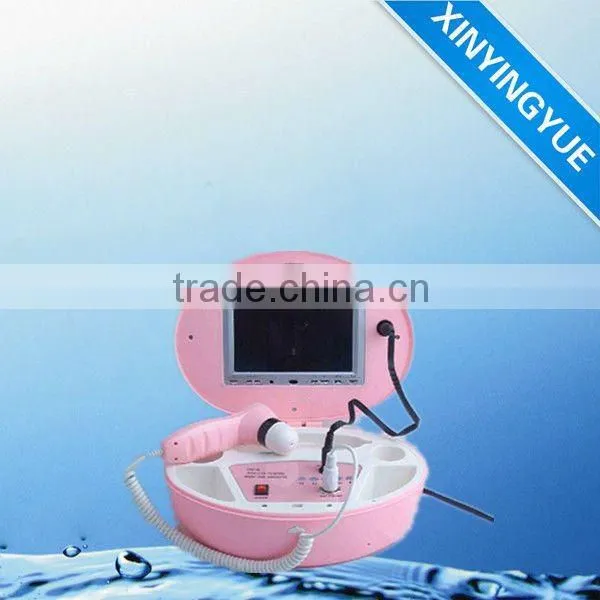
Boxy Skin and Hair Analyzer ( 50X and 200X)

Related Products
-
 2014 Updated Boxy Skin and Hair Analyzer ( 5 Lens)NegotiableMOQ: 1 Set
 -
Hot Home Use Skin Analysier Hair Scanner EquipmentUS$ 120 - 500MOQ: 1 Set
-
New Popular Beauty Equipment Portable USB Link Skin/hair AnalyzerUS$ 150 - 500MOQ: 1 Set
-
Medical Accuracy Skin Scanner MachineUS$ 30 - 500MOQ: 10 Sets
-
The Newest Professional Hair and Skin AnalyzerUS$ 200 - 400MOQ: 1 Set
Specifications:
Advanced Skin Analyzer
Input logo,print out report
Analyze 6 skin problems automatically
Magnify hair & analyze by chart
1. Skin Moisture:
You can use precision Moisture meter, like DM-R1 from Panasonic, to test the skin of Moisture. Click T position of the sample face→test moisture of customer’s face→read “digit” on the Moisture meter→input “digit” on the T zone→click “analysis” →Color piling chart below shows the results.
Same above, Click U position of the sample face→test moisture of customer’s face→read “digit” on the Moisture meter→input “digit” on the U zone→click “analysis” →Color piling chart below shows the results.
Advances products will be showed on the bottom. The Chart about relation of age and moisture will be display on the top right side. Click “next”→Sebum.
2. Sebum:
Sebum test by simply way
Click and select the T (U) position of sample face→Click “video” (more inf. See the 8-1)→pick up customer’s skin by USB Camera→Click “Capture”→Double click the capture picture→the skin will be display on the main image→ Click “Analysis”→ok!
Sebum test by the special oil test cotton
Using the way of 5-2-1 is simply and useful, but it is not accuracy and is good repeat consistency. Sebum test by the special oil test cotton can be got the good result with the high-accuracy, low error and better repeat consistency, but it is not simply operation with high cost.
Compare
Click “compare” on the bottom middle site, you can compare one skin with other skin with different position or different time, also you can draw line, outlines, mark and so on, see as below:
3D Display
Click “3D”→the similar 3-dimensional skin will be display on the screen→press and move the left key of mouse, you can see the skin of different positions.→Click “F3” got full screen display.Click "next"→Pores
3.Pores:
Click and select the T (U) position of sample face→Click “video”→pick up customer’s skin by USB Camera→Click “Capture”→Double click the capture picture→the skin will be display on the main image
Click zoom in→get yellow square (see as below)→move the yellow square to some place by the left key of mouse→the yellow square may be zoom in full screen.
Click line→keep to press the left key of the mouse→move from one point to another point→release the left key of the mouse→got one line with digit.
Click three points on the outline of area→got the circle cover the area and display digit automatically→see as below.Click “Next"→Keratin
→
4.Keratin:
Click and select the T (U) position of sample face→Click “video”→pick up customer’s skin by USB Camera→Click “Capture”→Double click the capture picture→the skin will be display on the main image→Click "Analysis”→the result of Keratin, see as below.
The red, yellow and green lamp on the top right corner will be lighted after analysis and tell you the sub-health level of skin automatically.Click “Next"→Surface
5. Surface:
Click and select the T (U) position of sample face→Click “video”→pick up customer’s skin by USB Camera→Click “Capture”→Double click the capture picture→the skin will be display on the main image→Click “Analysis”→the result of Surface, see as below.Click “Next"→Pigmentation
6. Pigmentation:
Click and select the T (U) position of sample face→Click “video”→pick up customer’s skin by USB Camera→Click “Capture”→Double click the capture picture→the skin will be display on the main image→Click “Analysis”→the result of Pigmentation, see as below.
7. Client Report:
After finishing 6 tests as above, Click “Next”→Client report

Send Inquiry to This Supplier

You May Also Like
-
Trade Assurance Quantum AnalyzerUS$ 40 - 75MOQ: 10 Pieces
-
Latest French Version Quantum AnalyzerUS$ 80 - 150MOQ: 1 Set
-
Manufacture Cat Clinic Biochemical Quantum AnalyzerUS$ 4,400 - 5,200MOQ: 1 Unit
-
Quantum Analyzer for Body ae Organism Electric Analyzer (Ostar Beauty Factory)US$ 1 - 2,000MOQ: 1 Set
-
58% Peoples Choice Latest 38 Reports Quantum AnalyzerNegotiableMOQ: 1 Set
-
Shotmay B-333 Acupuncture Machine Quantum Analyzer Magnetic Resonance With Low PriceUS$ 80 - 100MOQ: 1 Piece
-
Www.golden-laser.org/2013 New Style E-light+IPL+RF Machine Quantum AnalyzerUS$ 1 - 3,600MOQ: 1 Piece
-
Quantum Analyzer/ Quantum Resonance Magnetic AnalyzerUS$ 59.99 - 60MOQ: 1 Piece
-
Body Composition Analyzer Quantum AnalyzerUS$ 1 - 2,000MOQ: 1 Unit
-
Portable Mini Quantum Analyzer Quantum Resonance Magnetic Analyzer PriceUS$ 1 - 169MOQ: 1 Piece