








 Contact Platform Support
 Help Center
3D Object Scanner 5 MP Mini Portable a4 Scanner


Related Products
-
 USB Portable Document Scanner ,5Mega Camera Scanner A4 Capture Size,apply for Smart Office,school,bank,telecom CommunicationNegotiableMOQ: 10 Sets
 -
Eloam Hot Sale and Cheapest Portable Document Scanner S200L , Factory ProvideNegotiableMOQ: 10 Sets
-
Digital Mobile OCR Scanner S500L With High Speed Scan and OCR FunctionNegotiableMOQ: 10 Sets
-
Visualizer ,portable Scanner High Speed USB MIni Portable Document ScannerNegotiableMOQ: 200 Pieces
-
Portable Office Document Wireless Barcode Scanner Handheld A4 Scanner With 5.0 Mega PixelNegotiableMOQ: 100 Pieces
Specifications
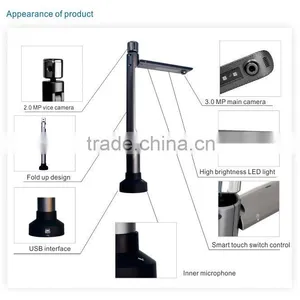
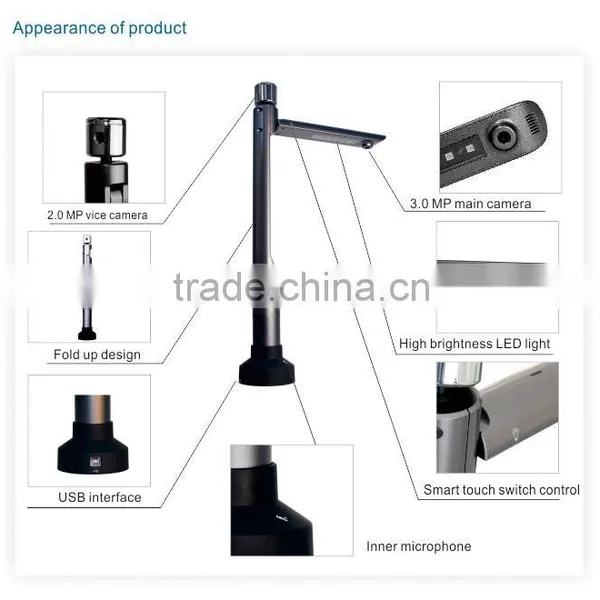
1.low-carbon scanner2.can scan documents,photoes,object
3.USB supply power
High speed capture document scanner with positioning platform for up to A4 size documents, with multi-functional software
Features:
1. 5 Mega pixels image resolution: 2592x1944
2. Scan size : Max. A4 (210mmx297mm)
3. USB powered
4. With document positoning platform
5. With multifunctional software which suppots image scanning, image edit, text recognition, PDF convertor functions
Hardware Specifications:
1. Image sensor: 1/2.5inch CMOS, 5 million pixels
2. Image resolution: 2592x1944,2048x1536,1600x1200,1280x1024,1024x768,800x600,640x480
3. Capture size: Max. A4 ( 420x210mm)
4. Light source: Natural light or LED lights
5. USB2.0 interface
6. Auminum alloy case
7. Scanner size: 425x245x128mm
Software Speicifications:
1. Main functions: Scanning, File editting, OCR,Video recording
2. Scan type : Capture to image
3. Image format: BMP/JPG/PNG/TIF
4. File editting: Rotation, Annotation, Crop, Brightness/Contrast/Saturation Adjustment
5. File convertion: PDF/RTF/DOC
6. OCR language: English, Chinese
7. Video format : AVI
System Requirements:
1.Windows XP/Vista/7, Mac OS 10.5 above
2. CPU 2.3GHz recommended
RAM 1GB minimum, 2GB recommended
1GB free hard disk space
CD-ROM drive
USB2.0 port
How to use:
1. Connect the product to computer with USB cable
2. Install software provided with the product
3. Put the product at the defined location on document pad
4. Put document or 3D object to display on the specific area on document pad
5. Open software to display the document or 3D object on computer screen
6. Use software to zoom, rotate, annotate, crop, capture image

Send Inquiry to This Supplier

You May Also Like
-
ScannerNegotiableMOQ: 2000 Pieces
-
IP68 RFID Portable Scanner for Security Guard Tour PatrollingUS$ 60 - 85MOQ: 1 Set
-
ScannerNegotiableMOQ: 1 Unit
-
USB Cable for Barcode Scanner RJ45 to USB Barcode Cable for ScannerUS$ 1.5 - 2MOQ: 500 Pieces
-
3d Foot Pressure ScannerUS$ 5,000 - 8,900MOQ: 1 Set
-
VAG409 ScannerNegotiableMOQ: 1 Set
-
Remax CNC Router Machine 3D ScannerUS$ 5,873 - 5,900MOQ: 1 Set
-
Xingtong Xt6201mrz Bearing dm Code Industrial Barcode Reader, Passport Ocr Scanner Gun, Laser Engraved Code Scanner Gun ManufacturerUS$ 116.15 - 119.23MOQ: 1 Piece
-
XT205M2B POS Barcode Scanner Machines Modern QR Code Scanner Barcode Readers ModulableNegotiableMOQ: 1 Piece
-
XTIOT XT7302P China QR Isbn Bar Code Scanners With PLC DB-9 InterfaceUS$ 39 - 46MOQ: 1 Piece


