








 Contact Platform Support
 Help Center
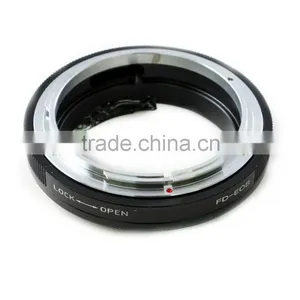
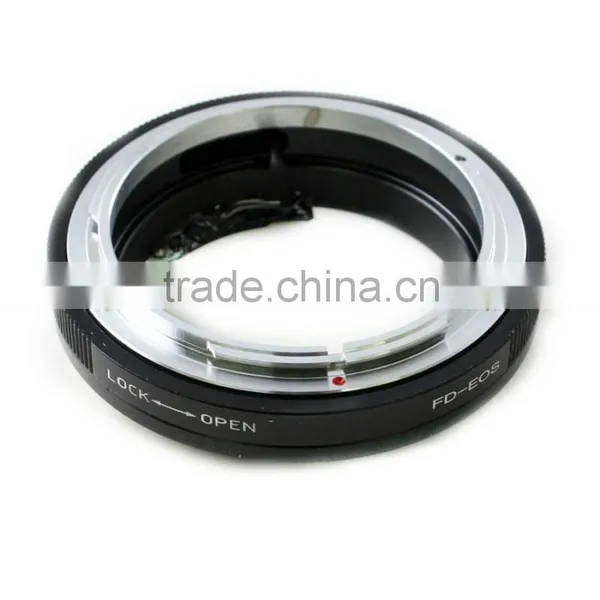
Macro AF Confirm (for)Canon FD Lens To (for)Canon Adapter

Related Products
-
 Macro AF Confirm (for)Canon FD Lens to (for)Nikon F Mount AdapterNegotiableMOQ: 1 Piece
 -
AF Confirmed T2 Lens to (for)Olympus 4/3 (for)Panasonic Camera AdapterNegotiableMOQ: 1 Piece
-
AF Confirmed Tamron AdaptaII Lens to (for)Olympus 4/3 Camera AdapterNegotiableMOQ: 1 Piece
-
Macro AF Confirm C Mount 16mm Lens To (for) Canon EF AdapterNegotiableMOQ: 1 Piece
-
AF Confirmed M42 to (for)Olympus E Camera AdapterNegotiableMOQ: 1 Piece
Specifications
Macro Confirmed AF (for)Canon FD Lens to (for)Canon mount adapterFor using (for)Canon cameras with (for)Canon FD lens.
It does not have any optic element, and cannot focus infinity, but it is macro confirmed.
This AF-Confirm adapter is an emulation of (for)Canon EF auto-focus lens and has the electronics to communicate with the (for)EOS camera and bring back these two Great Features!! By using our adapter your (for)pentax lenses can trigger the Focus Confirmation indicator and you can Really get the desired Light Metering Modes as you wish.
It is a solution you can purchase for your (for)Canon FD lenses and enjoy instantly the fun of using manual focus lenses with focus confirmation and various light metering modes. No more painful focus guessing and difficulties in telling correct focus by naked eye.
You should remember that the pusher with the fixed ring doesn’t work, so diaphragm control of the lens is set manually. This adapter can work with lenses having both only automatic diaphragm (A) and selector A/M (automatic/manual diaphragm). It is possible to use Macro rings and other accessories.
Working with (for)Canon FD lenses acknowledgement of the focusing with green light is not made. The aperture is set «0.0». Expo-modes:
- P (program) – identical to Av mode;
- Tv (flash priority) – doesn’t work;
- Av (diaphragm priority) – works as usual;
- M (manual) – aperture and flash are changed. Inaccuracy of exposure defining is indicated by expo-correction.
Settings:
- Put red marks of the adapter and lens collar togetter.
- Turn the adapter clockwise till the fixative click.
- Set (for)Canon FD lens.
Removing:
To remove the adapter you should unpress fixative pin and turn the adapter clockwise.

Send Inquiry to This Supplier

You May Also Like
-
MOZA AirCross 3 3-Axis Handheld Gimbal Stabilizer for CameraNegotiableMOQ: 1
-
SLR Camera Videotape Guide Translation Small Camera Rail SliderUS$ 27 - 40MOQ: 1 Set
-
2013 Hot Selling High Quality Camera PartsNegotiableMOQ: 200 Pieces
-
Hot Sale Wireless Monopod .bluetooth Monopod.monopod Selfie Stick.monopod With BluetoothUS$ 1 - 20MOQ: 30 Pieces
-
Glide Gear Video Dslr Camera Gimbal Stabilizer China Table Top Skater Dolly Roller Stabilizer CameraUS$ 11 - 100MOQ: 100 Pieces
-
Camera Tripod,camera Tool,tripodUS$ 4 - 4.5MOQ: 2000 Sets
-
Friction Articulating Magic Arm 1/4" Hot Shoe Connector for Camera LCD Monitor LED LightUS$ 6 - 7MOQ: 200 Pieces
-
Fashional Satin Nylon Camera Straps,shoulder Camera StrapsNegotiableMOQ: 300 Pieces
-
Melting Temperature Indicating Stick/ Thermo Stick/ Thermo CrayonUS$ 1,000 - 2,000MOQ: 5 Pieces
-
Selfie Mobile Phone Monopod With Wire/selfie Monopod/monopodUS$ 1.69 - 1.92MOQ: 2000 Pieces


