








 Contact Platform Support
 Help Center
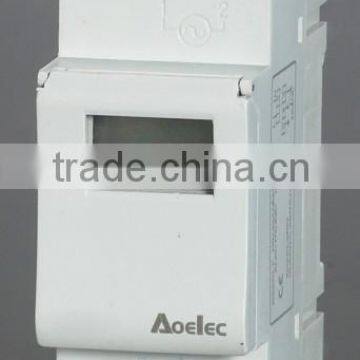
AUSDT CE Certificate Electrical Weekly Digital Time Switch


Related Products
-
 DHC20 Din Rail With CE Certificate 24 Hour Time SwitchUS$ 10 - 15MOQ: 200 Pieces
 -
DHC20 24 Hour Time SwitchUS$ 11 - 12MOQ: 200 Pieces
-
DHC20 24 Hours Programmable Time SwitchUS$ 11 - 12MOQ: 200 Pieces
-
AUSDT Weekly Programmable Time SwitchUS$ 9 - 11MOQ: 200 Pieces
-
24 Hours Programmable Electronic 3 Phase Timer SwitchUS$ 10 - 15MOQ: 200 Pieces
© WEEKLY PROGRAMMABLE ELECTRONIC TIMER
DIN Rail Installation
Advanced pre-setting one week before
Latest technology COMS quartz Mico-controller
Digital electronics general purpose time switch with daily and weekly programs
Repeat programs with 8 ON/OFF settings.
To-the-minute setting accuracy.
LCD display real time to Hour/Minute and ON/AUTO/OFF.
Technical Data
Voltage limit: AC180V~264V(50/60Hz)
Hysteresis: ≤1s/d(at 25°c)
On/off operation: 8on & 8off
Minimum interval: 1 minute
Weight: Approx 150g
Display: LCD
Battery backup: 150h
Number of circuits: 1c
Load capacity: 16A 250VAC(ohmic load cosΦ=1)
Service life: Mechanically:107
Electrically:105
Ambient temperature:-10~55°c
Storage temperature:-20~70°c
Power consumption: 5VA
DIMENSIONS
OPERATING INSTRUCTION:
1.First time use this timer switch,please input AC and let battery recharge,after then press reset key.
2.At first time,the timer switch is in 24h mode.If you want change to 12 mode please press on "©"
key 5s,and LCD will display AM.If you want re-change to 24h mode,and press on "©" key 5s to return.
3.Programming:
| Step | Key | Programming |
| 1 | Press P | Setting 1 ON time(display 1 ON) |
| 2* | Press D+ | Select days of week(If you want same set in every day,you need not press this key |
| 3 | Press H+/M+ | Set hours and minutes |
| 4 | Press P | Setting 1 OFF time(display 1 OFF) |
| 5 | Press D+ | Select days of week(If you want same set in every day,you need not press this key) |
| 6 | Press H+/M+ |
Set hours and minutes |
| 7 | Repeat step 2-6 | Set 2-8 on/off time |
| 8** | Press © | End |
For cancel engagements,press"MANUAL" then "--:--" is displayed on LCD to confirm cancel.May press "MANUAL" again to resume initial setting.
*10 deferent mode:(1.MO 2.TU 3.WE 4.TH 5.FR 6.SA 7.SU 8.MO TU WE TH FR 9.SA SU 10.MO TU WE TH FR SA SU)
**If you need not 8 time setting press " © "key to the end
4. CLOCK SETTING
(1) Press " © " and " D+ " together till correct date is shown.
(2) Press " © " and " H+ " together till correct hour is shown.
(3) Press " © " and " M+ " together till correct min is shown.
(4) Press " MANUAL " key to display ON AUTO or AUTO OFF.(If this clock in your program is ON selects ON AUTO,and this clock in your program is OFF selects AUTO OFF)
5.If you alway want to use time switch ON or OFF,Please Press "MANUAL" key to display " ON " or " OFF "
NOTE:
The power consumption of connected electrical appliances,shall be within.
The limitation of following rated capacity.
About us:
Aoelec Electrical was established in 2003,with 50 office guys and 240 workers now.Our products are present in more than 30 different countries from Middle Ease to South American,from Europen to Australia,from Southeast Asia to North Africa.And our Miniature circuit breaker have KEMA,TUV,SEMKO,CB and CE certificates.

Send Inquiry to This Supplier

You May Also Like
-
Timer SwitchNegotiableMOQ: 2700 Pieces
-
BL-0603 Programmable TimerUS$ 5 - 10MOQ: 20 Pieces
-
AHC15A Timer SwitchUS$ 8.57 - 9.28MOQ: 200 Pieces
-
Weekly Programmable Electronic TimerUS$ 1 - 10MOQ: 100 Pieces
-
TAIYITO LED TDXE4404S Touch Screen 2-way Fluorescent Lamp/Appliance Timing SwitchNegotiableMOQ: 1 Unit
-
SYN161h Mechanical TimerUS$ 7.5 - 8.8MOQ: 500 Pieces
-
Popular Use 220v Time Controller Bell Control SwitchUS$ 5 - 10MOQ: 1 Piece
-
Hydroponic Digital TimerUS$ 4 - 6MOQ: 1000 Pieces
-
21A Mechanical DC Timer AUTO Switch for HeaterUS$ 1 - 2MOQ: 500 Pieces
-
Top Selling 2014 Timer SwitchNegotiableMOQ: 5000 Pieces


