








 Contact Platform Support
 Help Center
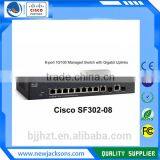
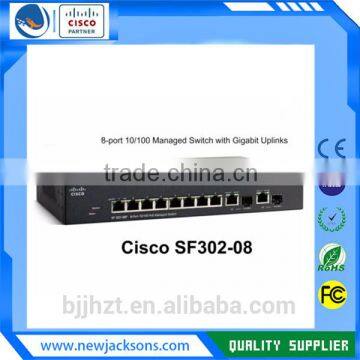
Linksys SF302-08 (SRW208G-K9-NA) 8-port 10/100 Managed Switch With Gigabit Uplinks


Related Products
-
 LINKSYS - SF300-08 - 8 Port Managed Ethernet Switch - SRW208-K9NegotiableMOQ: 1 Piece
 -
Linksys NEW Sealed SG300-52MP-K9 10/100/1000 Ports SG300 Series Switch for Small BusinessNegotiableMOQ: 1 Piece
-
Linksys SG300-28PP 28-Port Gigabit PoE Managed Switch SG300-28PP-K9NegotiableMOQ: 1 Piece
-
Linksys Cisco Small Business SF300-24PP - Switch - 24 Ports - Managed (SF300-24PP-K9)NegotiableMOQ: 1 Piece
-
NEW Linksys Small Business SG300-28 28-Port 2x SFP Network Switch (SRW2024-K9)NegotiableMOQ: 1 Piece
Product view
Running Express Setup
When you first set up the switch, you should use Express Setup to enter the initial IP information. This enables the switch to connect to local routers and the Internet. You can then access the switch through the IP address for further
configuration.
To run Express Setup:
Step 1 Verify that no devices are connected to the switch, because during Express Setup, the switch acts as a DHCP server. If your PC has a static IP address, before you begin, you should change your PC settings to temporarily use DHCP.
Step 2 Connect the AC power cord to the switch and to a grounded AC outlet. The power-on self-test (POST) begins. During POST, the LEDs blink while a series of tests verify that the switch functions properly. LED behavior during POST is unpredictable and might vary.
Step 3 Wait for the switch to complete POST. It might take several minutes for the switch to complete POST.
Step 4 Verify that POST has completed by confirming that the SYST LED rapidly blinks green. If the switch fails POST, the SYST LED turns amber. POST errors are usually fatal. Call Cisco Systems immediately if your switch fails POST.
Step 5 Press and hold the Mode button for 3 seconds. When all of the LEDs above the Mode button turn green, release
the Mode button. If the LEDs above the Mode button begin to blink after you press the button, release it. Blinking LEDs
mean that the switch has already been configured and cannot go into Express Setup mode.
Step 6 Verify that the switch is in Express Setup mode by confirming that all LEDs above the Mode button are green. (The redundant power system (RPS) and Power over Ethernet (PoE) LEDs remain off on some models.)
Step 7 Connect a straight-through Category 5 Ethernet cable (not provided) to any 10/100 or 10/100/1000 Ethernet port on the switch front panel and to the Ethernet port on the PC.
Step 8 Verify that the LEDs on both Ethernet ports are green.
Step 9 Wait 30 seconds.
On-site and Remote Cisco Services:
>Audit of your existing IT systems to ensure the most efficient use, including how Cisco equipment and services are being used.
>Supply of Cisco hardware, software and services.
>Implementation of Cisco hardware and software.
>Support and Maintenance of your IT infrastructure.
Support
Lead Time: We usually take 3-5days in delivery to the major worldwide cities.
Technical Support: We provide free technical support for all equipment purchased from New Jackson. This substantially reduces risk for our customers, and, should an issue arise requiring intensive technical support, delivers significant cost savings.
Our team is one of the most knowledgeable and experienced in the new and used equipment market. They are available to answer your product-related questions or to help you to troubleshoot any network issues. They can help with both pre- and post-sales support.We have ready access to extensive product documentation and literature, and can provide insight into the latest industry innovations and technologies.
Personalized Service: We provide personalized services in the area of packaging, quick response, technical support, safe packing, shipping etc
Employing firewall solutions from vendors Cisco, can help your business:
• Control incoming and outgoing traffic between the Internet and your protected networks
• Hide your internal IP addresses from the external network
• Control User Authentication
• Configure access rules by user or group
• Secure communication tunnels for remote users/Branch Office VPN
• Filter by user, group, time-of-day or content category
• Generate reports to show user network activity
• Create secure wireless connectivity for your office LAN and segregated wireless networks for visitors
DHL Express
FedEx Express
UPS ---The ups store
TNT---Sure we can
Our company is a corporation legally registered in Beijing of China in 2002.
Mission Statement:
We treat our customers with the highest level of Integrity. We focus on relationships. Our goal is to become our customers' trustworthy advisor for IT.
We serve customers all over the world. Our company buys and sells industry leading IT equipment on Cisco Systems and a host of others. We specialize in complete end-to-end sale and offer a range of customized services, including evaluation, remarketing, transportation and packaging.
With years of industry experience, our team can provide the best network design service and get the most out of your IT budgets. With a large inventory on hand and the strategic partnerships with clients around the world, we are also able to deliver high quality pre-owned IT equipment at exceptional prices with fast delivery.
Our company has subsidiary companies:
- BVI (British Virgin Islands) named REAL FORTUNE ENTERPRISES LIMIT
- Canada named MUSE DEVELOPMENT INC.
- The USA (Center) located in Atlanta GA
Organization chart

Send Inquiry to This Supplier

You May Also Like
-
Siemens Ethernet Switch 6GK5005-0BA10-1AA3 6GK5 005-0BA10-1AA3NegotiableMOQ: 1 Piece
-
32 Port Poe Switch Price 16 Port 32 Port Poe SwitchUS$ 1 - 99MOQ: 1 Piece
-
HDMI Switch Box 4x1 VK2-0036NegotiableMOQ: 500 Pieces
-
ZXR10 3906US$ 10 - 5,000MOQ: 1 Piece
-
ZTE 5928E-FI, RS-5928E-FI, RS-59EC-PWR-AC10, RS-59EC-PWR-DC10, 24 GE SFP+ 1 Expansion Card ZTE ZXR10 5928E-FI 5916E 5952E RS-59US$ 100 - 1,000MOQ: 1 Piece
-
Raisecom RC511-4FE-S1 1-Port Fiber to 4-Port Ethernet Converter With 3-Year WarrantyNegotiableMOQ: 100 Units
-
NetEngine 8000 M1A Enterprise-level Router, an Edge Router, Supports Srv6US$ 3010.84MOQ: 1 Unit
-
Buffalo 8-port White Switch Lsw4-tx-8ns/whUS$ 52.31 - 53.85MOQ: 1 Piece
-
H3C LS-5130S-52S-PWR-EI-AC-R Enterprise POE Switch - 48 Gigabit Ethernet + 4×10G SFP Fiber Uplink Ports, Layer 2/3 Managed SwitchNegotiableMOQ: 1 Unit
-
Brocade G610 Network Switch BR-G610-8-16G-0/BR6505/BR6510/BR6520/G610/G620G/630/G720US$ 2999 - 3012MOQ: 1 Piece


