








 Contact Platform Support
 Help Center
Digital Visualizer, Document Camera, Video Presentation Equipment


Related Products
-
 USB Camera Visualizer, Presentation EquipmentNegotiableMOQ: 500 Pieces
 -
Popular Portable Visual PresenterUS$ 49 - 55MOQ: 1000 Sets
-
A4 SIZ 5mega Document Visual PresenterUS$ 60 - 90MOQ: 1 Set
-
2013 School Visual Presenter Teaching EquipmentUS$ 60 - 90MOQ: 100 Sets
-
USB 5V Portable Education VisualiserUS$ 60 - 90MOQ: 100 Sets
Specifications
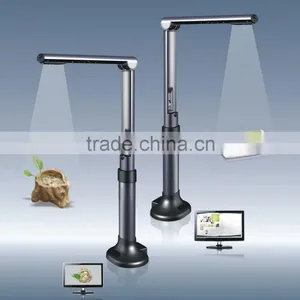
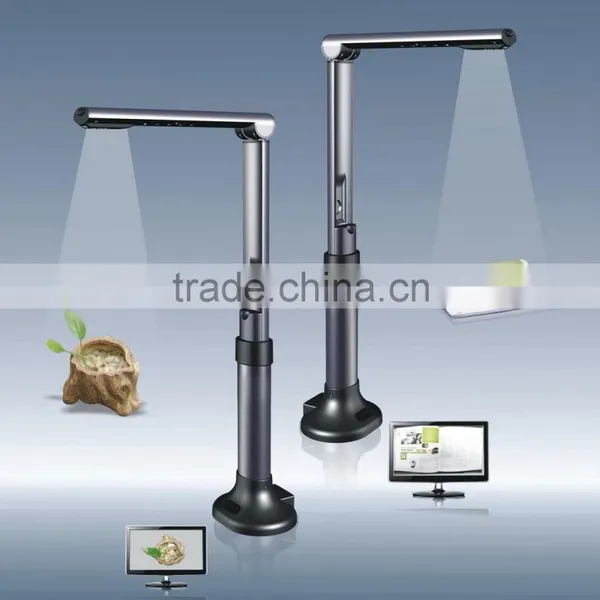
Portable Digital Camera Visualizer with document object scanning, presentation functions,a kind of new shool teaching equipmentProduct description:
A kind of new shool teaching equipment Portable Document Camera with document object scanning, presentation functions.
only USB power required, work with PC/ notebook, easy to operate , widely used in school or office as viusal presentation
equipment , fast, convenient, green, affordable , a good choice for teachers and students.
Hardware Specifications:
1. Main Camera: 1/2.5inch CMOS, 2 million pixels
2. Image resolution:1600x1200,1280x1024,1024x768,800x600,640x480
3. Capture size: Max. A4 ( 210x297mm)
4. Light source: Natural light or LED lights
5. USB2.0 interface
6. Auminum alloy case
7. Product size: 337x245x128mm (opened), 337x100x128mm (folded)
8. Product weight 760g
Software Speicifications:
1. Main functions: Scanning, File editing, OCR,Video recording,
2. Scan type : Capture to image
3. Image format: BMP/JPG/PNG/TIF
4. File editting: Rotation, Annotation, Crop,Brightness/Contrast/Saturation Adjustment
5. File convertion: PDF/RTF/DOC
6. OCR language: English, Chinese
7. Video format : MPEG4
System Requirements:
1.Windows XP/Vista/7, Mac OS 10.5 above
2. CPU 2.3GHz recommended
RAM 1GB minimum, 2GB recommended
1GB free hard disk space
CD-ROM drive
USB2.0 port
How to use:
1. Connect the product to computer with USB cable
2. Install software provided with the product
3. Put the product at the defined location on document pad
4. Put document or 3D object to display on the specific area on document pad
5. Open software to display the document or 3D object on computer screen
6. Use software to zoom, rotate, annotate, crop, capture image

Send Inquiry to This Supplier

You May Also Like
-
Other Teaching & Demonstration ToolsNegotiableMOQ: 2000 Sets
-
1 Dollar Store Stationary China Product Cheap Document BagUS$ 0.05 - 0.3MOQ: 200 Pieces
-
XK-GCR-B Vocational Training Equipment, Laboratory Equipment, Refrigeration System TrainerUS$ 1,000 - 10,000MOQ: 1 Set
-
10 Inch (25.4cm) Flat File Holder With Adjustable 3 Position for Woodworking ToolsUS$ 1 - 30MOQ: 3000 Pieces
-
China Stationery Markets A4 Certificate HolderUS$ 0.7 - 1MOQ: 1000 Pieces
-
Medical Fast Freezing Histology MicrotomeUS$ 1,800 - 3,600MOQ: 1 Set
-
Directly Manufacture USB Digital Current Sensor Used as School Science Laboratory EquipmentUS$ 20 - 40MOQ: 1 Piece
-
Soft PVC Office File Document Bag With Zipper Quality ChoiceUS$ 0.1 - 0.5MOQ: 10000 Pieces
-
Wonder File FolderNegotiableMOQ: 2000 Pieces
-
PP Lever Arch FileUS$ 0.75 - 1.15MOQ: 5 Pieces


