








 Contact Platform Support
 Help Center
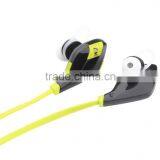
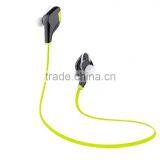
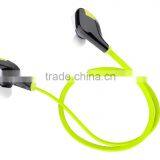
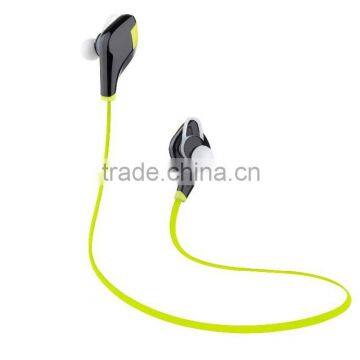
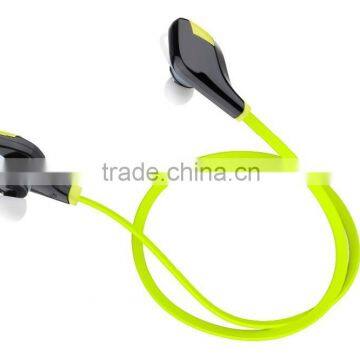
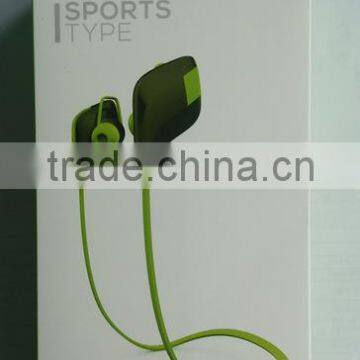
2015 Private Moudle Wireless Hidden Invisible Bluetooth Stereo Earphone


Related Products
-
 2015 New Model Private Moudle Mini Bluetooth Stereo EarphoneUS$ 1 - 7.5MOQ: 100 Pieces
 -
New Model Headset Sports Wireless Mp3 Player HBS900US$ 9.46 - 10.66MOQ: 1 Piece
-
New Style Stereo Bluetooth Headset With Mp3 Player HBS 900US$ 0.55 - 6.5MOQ: 1 Piece
-
2015 New Model Wireless Bluetooth Stereo CSR4.0 Sport Neckband Headset HBS930US$ 1 - 22MOQ: 50 Pieces
-
Sports Headsets Phone Wireless Hidden Invisible Bluetooth Earphone HBS800US$ 9.46 - 10.66MOQ: 1 Piece
Features:
--Built-in HD microphone&speaker, handsfree controls for ultimate convenience
--Bluetooth V4.1, connect with two phones simultaneously
--High-fidelity stereo music and clear speech within 10 meters
--Mini unique earbuds with Golf clubs shape
--Technical ergonomics design 9mm in-ear audio earplugs
--Special own-designed retail package and manual
--Intelligent voice prompt
--Grade A Li-polymer battery, incomparable long standby
Technical Specifications:
--Correspond with: Bluetooth V4.1
--Bluetooth profile: HSP, HFP, A2DP, OPP, AVRCP
--Transmitting Power: Class 2
--Transmission range: 10M, 360°
--Frequency Range: 2.4026GHz-2.480GHz
--Operating voltage and current: 3.7V/14mA
--Li-polymer battery: 80mA
--Charging time: ≤2h
--Music playing time: ≥6h
--Talking time: ≥5h
--Standby time: ≥175h
Magift5 Bluetooth headphone universal accepted to various Bluetooth electronic devices, such as below:
Product picture in this manual is for demonstration purpose.
Actual products may be different.
Pairing the headphone:
Put earbuds into ear with clockwise rotation, wearing the right way to the most stable position.
Have 1st Bluetooth device paired with the headphone.
a. Long press “MFB” for 7 seconds till red and blue LED indicator light flashing alternately and the headphone will report “Power On” and then “Pairing”.
b. Enable the Bluetooth function of the device and search for available Bluetooth devices, then select “Magift5” from the search results.
c. Input the pass code “0000” to finish the pairing, the red and blue indicators will stop flashing, you will hear a “Beep”, means it’s connected.
Have the 2nd Bluetooth device connected with the headphone .
a. Long press “MFB” for 7 seconds till blue indicator light is off (it will report “Power Off”) and 1st Bluetooth device automatic disconnect with headphone.
b. Turn on the headphone again.
c. Turn on Bluetooth function in the 2nd device and search “Magift5”, and then repeat the same procedures how to connect 1st device.
d. Meantime, click previous pairing records and connect your 1st device with the headphone.
Turn on/ Turn off
Press the MFB button for 3 seconds when the device is off/ on.
(Blue LED slowly flashes and headphone report “POWER ON”/ “POWER OFF”)
Using the headphone:
Listen to music
Action in paired mode with music playing
1. Tap (press less than one second) the “MFB” to play/pause the audio track or video clip.
2. Short press the “” button to last/next track function.
3. Long press the “” button to adjust volume.
Handsfree for incoming call
Action in paired mode with incoming call
—Answer: Short press (less than one second) the “MFB” button
—End : Short press (less than one second) the “MFB” button
—Reject: Press the “MFB” button and hold for two seconds
Redial the last phone number: Double press the “MFB” button in paired mode
Charging the headphone:
Connect the charger plug to the charging socket, the LED turn red,
it will be turn to blue light after fully charged. Pull up the charger, the headphone into shutdown state.
LED indications:
Red and Blue flashing
Bluetooth device pairing mode
Flashing Blue
Headset and Bluetooth device connected or power on
Flashing Red
Headset low power status, or headset disconnected
Solid Red
Headset charging, and the red LED will turn off if charging finished
No light
Headset powered off
Notes:
LEDs are not light
a. Recharge; b. Check the condition during charging; c. Repress MFB.
Bluetooth not connecting
a. Restart, re-establish pairing connection; b. Change Bluetooth device; c. Make sure your device Bluetooth activated.
Distorted sound & Microphone not working
a. Connection standard distance is within 10m; b. Confirm active output audio device on your Bluetooth device; c. Adjust volume; d.Turn off and recharge.
SAFETY PRECAUTIONS
Please read, follow and keep these instructions.
Keep the device out of extreme heat and humidity.
Power time may differ depending on personal habits.
Heed all warnings on the product and in the operation instructions.
Do not listen at high volume levels for long periods to protect hearing.
Do not use the device near water ,such as sinks,bathtubs,swimming pods etc.
Stop using this product immediately if it causes discomfort or pain.
When using this product, it is recommended that you limit volume to help avoid harm to your ears and danger resulting from being unable to hear what is going on around you.
WARNINGS!
Using a headphone while driving can distract you and increase an accident.
Prolonged listening at night volume could lead to hearing damage.

Send Inquiry to This Supplier

You May Also Like
-
Original Wireless Headphones M11 TWS 5.0 In-ear Wireless Earphones HiFi IPX7 Waterproof Headset for SportsNegotiableMOQ: 1
-
for Apple Earphones (Remote and Microphone)NegotiableMOQ: 10 Pieces
-
BHNHEADM161153 ELectronic Product Headphone Multi Media Headset With Microphone Stocklots 1000 PcsUS$ 2 - 2.5MOQ: 1000 Pieces
-
2015 High-end Smart Bluetooth Wireless Neckband HeadsetUS$ 18 - 25MOQ: 1000 Pieces
-
Rechargeable Wireless Head Wearing Bluetooth Headset BH-M20NegotiableMOQ: 1 Piece
-
GoJo Hands Free Adjustable HeadsetNegotiableMOQ: 1000 Sets
-
Wireless HeadsetNegotiableMOQ: 1
-
Wireless Headset Mono Bluetooth Headset Earphone Headphone Gaming Bluetooth Headset for Mobilephone Laptop TabletUS$ 5.47 - 5.47MOQ: 100 Units
-
2014 Best Seller 5 in 1 Wireless Headset fm Radio Mp3 sd Card /Wireless HeadphUS$ 0.1 - 1MOQ: 3000 Sets
-
Wireless HeadphonesNegotiableMOQ: 1

