








 Contact Platform Support
 Help Center
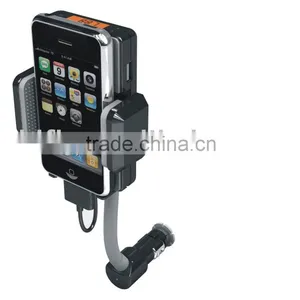
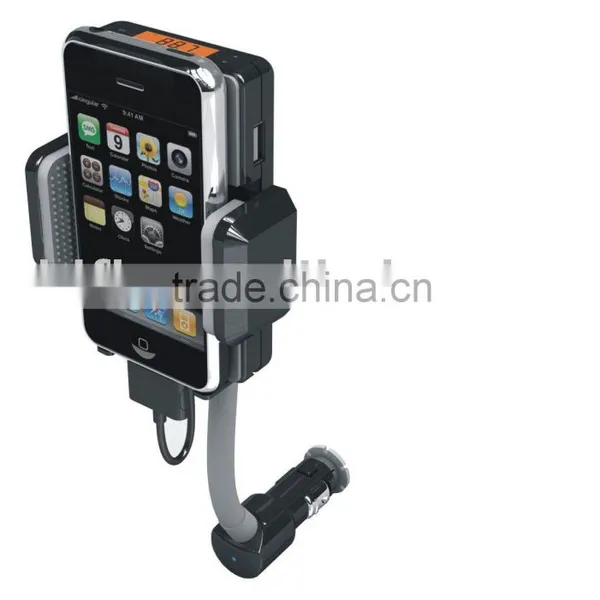
F10 ALLKIT (GF-F10)


Related Products
1.Turn on your car radio and tune to an unused FM station.
2.Place your player/Phone into the Flexpod dock by pressing the cradle Lock Release button
3.Now secure your player/Phone into place by adjusting the Cradle Wings
4.Connect your player/Phone to the Flexpod dock with the supplied player connector
5.Plug the Flexpod into car lighter ,the LCD display will turn on
6.Adjust angle of the Flexpod suing knob in back of the dock and and the flexible neck
7.Use the up/down frequency selector,to the right of the LCD screen, on the Flexpod to match the frequency of the unised FM station on radio that you have choosen.
8.You can also use the Quick Scan(QS)button to quickly scan frequencies
9.Please note:use the manual station changer on your radio,not the radio??s scan feature.Scanning will bring you ro the next broadcast station. You want an unused station
10.TO release your player/Phone press the Cradle Lock Release button
To power supported USB devices
You can also charge other USB enabled devices such as mobile phones,and BlueTooth headsets with your Flexpod.You should use the specialized charging cable that came with your device.You can also use the supplied USB cable if your device will accepta mini USB plug.Plug in the USB cable into the USB port of the Flexpod to begin charging Phone Hands
Free function:
If you want to use this function while you are listening to music:
1.After connecting your Phone to the Flexpod with the supplied player connector,also connect the supplied mini-jack from the Flexpod??s hand??s free port to your device??s headset outlet
2.When you receive a call,just press the ??Answer?? button on the Phone touch screen,the music will pause and you will hear the conversation through your car speakers.
3.Your voice will be picked up via the microphone built into your Phone
4.After ending the call,the music will automatically resume
5.You can make outgoing calls by dialing the phone number and pressing the Talk button on your phone. The music will pause and you will hear the conversation through your car speakers
6.To release your player/Phone press the wing release button
Technology parameter??
1.Frequecny feature??20Hz-20KHz Separation degree???0dB
2.Working current??38mA+10mA Signal to Noise???0dB
3.Audio distortion??<2%??mod=75KHZ. F=1KHZ??Mixed and harmonic wave and??<-35db
4.Working voltage??9~24V??Car's cigar' lighter ) Output voltage:5V/1mA
5.Flexible range:39-63mm
6.we warranty quality of our products,competitive prices.

Send Inquiry to This Supplier


You May Also Like
-
 User Manual Car Mp3 Player Audio Stereo In Dash Fm Receiver With Mp3 Player & USB SD Input AUX ReceiverUS$ 1 - 100MOQ: 100 Pieces
 -
11 in 1 All Kit (GF-F11)NegotiableMOQ: 1 Piece
-
Multifunctional Extended Car Charger With 115W High-Power OutputNegotiableMOQ: 1000 Pieces
-
Factory Supply Nile T600m Portable fm Transmitter for Car Mp3 With Cd-like High-fidelity Stereo Sound, Wireless Transmitter for Square DanceUS$ 53.54 - 59.69MOQ: 1 Set
-
High Power, High Efficiency Compact Mini Amplifier-4x100W @ 4 OhmsNegotiableMOQ: 500 Units
-
RCD410 PRO Android Auto Carplay New NONAME RCD330 RCD360 PRO MIB Radio For VW Golf MK5 MK6 Jetta MK5 MK6 CC Tiguan Passat B6 B7 PoloUS$ 260 - 300MOQ: 1 Piece
-
2024 Bus Gps Auto Announcer System From ShenZhen TamotecUS$ 110 - 200MOQ: 1 Piece
-
Head Rotor Bosch 1 468 334 378 for BMWUS$ 1 - 10MOQ: 1 Bag
-
One Din EQ RCA AI Voice Assistant Bluetooth Mp3 Player For CarUS$ 7 - 9MOQ: 100 Pieces
-
Factory Supply, Car Kit MP3 Player Wireless Hands-free Bluetooth FM Transmitter, New ArrivalUS$ 7 - 9MOQ: 100 Pieces

