








 Contact Platform Support
 Help Center
IP Intruder Alarm System With APP Control


Related Products
-
 New Technology Internet Cloud Based IP Wireless Alarm FC-300US$ 148 - 220MOQ: 1 Piece
 -
Cloud IP Alarm With Smart Phone/Tablet APP ControlUS$ 148 - 220MOQ: 1 Piece
-
IP Cloud Alarm With Smart Phone/Tablet Control SystemUS$ 148 - 220MOQ: 1 Piece
-
IP- Enabled Network Alarm for Family and PropertyUS$ 148 - 220MOQ: 1 Set
-
IP Wireless Burglar Alarm System FC-300 With No GSM SlotUS$ 148 - 220MOQ: 1 Set
Specifications
868 FSK cloud TechnologyControl home by mobile APP anywhere
No need GSM card
Instant PUSH and email
Multi Languages
Finseen New Cloud IP Technology Home Alarm
NOT GSM Alarm New Wireless 868FSK Security Alarm
Control your home by mobile APP anywhere
Instant PUSH and email notification
99wireless zone fully protect your home
Innovative Finseen IP Cloud Alarm kits—A New Cloud-Based Alarm Solution for the residential market!
Key Benefits
. No need GSM card
. Control the alarm by phone APP
. Built 5 Cloud Servers in the world to ensure the alarm signal
Easy Access
Intuitively designed mobile interfaces make it easy to interact with your alarm system.
Instant Awareness
Real-time alerts are delivered right to your mobile device when activity takes place at your property.
Remote Control
Arm your system or diarm, Home Arm setting from your phone remotely.
Difference Between Cloud IP Alarm and GSM Alarm
|
Finseen Cloud IP Alarm |
GSM Alarm |
Frequency |
866MHz |
Mainly 315/433MHz |
Technology |
868 FSK Cloud Service |
GSM phone technology |
Phone Card |
No need. Internet cloud service |
GSM card |
Cost |
No cost |
Pay for GSM card rent every month |
Operation |
Phone/tablet APP control the whole system anywhere |
Panel keyboard control the system |
Notification |
Instant PUSH Notification on phone or sending Email |
Sending SMS to phone |
Alarm Way |
Phone APP blow and siren blow at the same time, can blow while having phone call |
Dialing to the phone, can not blow while having phone call |
Signal |
strong and fast, we spend millions dollars built 5 servers over the world |
Weaker and slower, share server with others, don’t have own server |
Antenna |
No, but with strong signal via cloud server |
Yes, signal unstable |
Rate of False Alarm |
Low. 868mhz FSK technology, get accurate indicator by Cloud Servers. |
High. Alarming while neighbor’s alarm triggered. Always interference by other’s alarms |
Tamper-proof |
“Tamper Triggered” inform to your phone and blow on phone |
No notification |
Learn accessories |
10 seconds. Easy and saving time, wireless learning, just add to the phone APP |
Some minutes. Complicated, input many information |
Name the Zones |
Name every accessories |
Can Not. |
Specification
Power supply: |
5V/1000MA |
Battery: |
lithium battery 800MA/H |
Receiving Frequency |
868.35MHz |
Emitting frequency |
868.35MHz |
Receiving and emitting distance: |
More than 100m under open area |
Standby Current: |
220MA |
Alarm Current: |
310MA |
1. What is Finseen Cloud IP Alarm System?
Finseen Cloud based IP Alarm is a latest technology burglar alarm system controlled by your smart phone or tablet via the internet. The IP Alarm Cloud drives the system, which provide you with information about who enters your house, which sensor has been triggered etc. Notifications are distributed to friends and neighbors, ether by PUSH or email. Power and internet connections are surveyed online. Should one interrupt the power or the internet, the system will notify you within seconds. The app can monitor and control the system from anywhere as long as your phone or tablets connected to the internet.
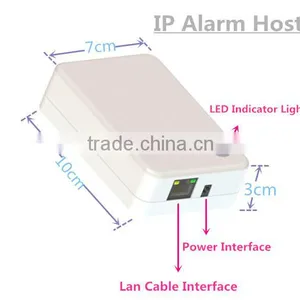
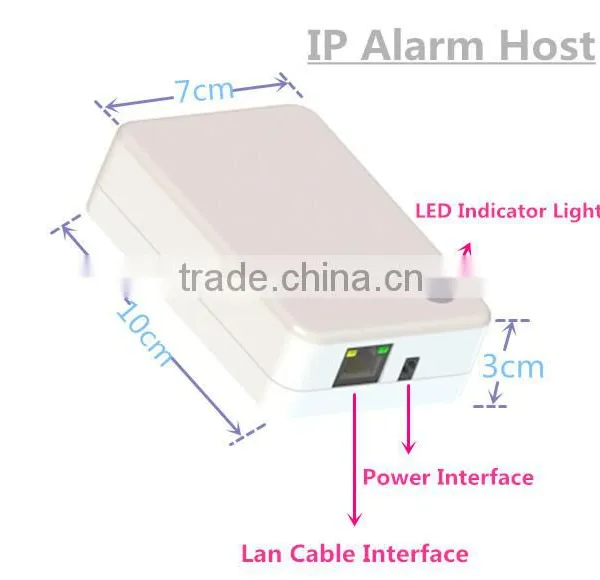
The central unit of the system is the IP Alarm Scanner(Alarm Host/Panel).
2. How do I set up the Finseen Cloud based IP Alarm system?
The system is a DIY [Do it yourself] system with a minimum of setup. Just download and install the “IP Alarm” app from Google Play or Apple App Store. Make sure the system is powered up and connected to the internet. Check that your mobile device is connected to the internet.
3. How can I log in APP?
Turn back the alarm host, you can find the Alarm ID and password from the sticker.
Then enter the ID and password and follow the guide to enter into your account email, user name etc.
4. How do I add/enroll new sensors after the installation?
Ensure the system under “disarm”mode,”
- Go to the menu ´Device’ in the IP app
- Select ‘+´ to add Device
- Select the appropriate device illustrated.
- Press ´Enroll´ and follow the instructions in the Video.
- Wait for the confirmation from the server.
- After enroll, edit the location name of the device.
- Done…
5. How can I know if the enroll sensors is successful or fail?
If your enroll succeeded, Red light of alarm host will flash quickly for 5seconds and the acoustic buzzer sound with 5 beeps at same rate as red light flashes.
But if your Enroll failed, Red light of alarm hot will be off, and Acoustic buzzer sound 1.5 s.
1 set/gift box,
6 gif box/carton

Send Inquiry to This Supplier

You May Also Like
-
Electronic Horn/buzzing Sound(Wechat:13510231336)NegotiableMOQ: 500 Cartons
-
Fragile StickerUS$ 10 - 100MOQ: 2000 Sheets
-
Security AlarmNegotiableMOQ: 2500 Combos
-
Safety With AlarmUS$ 0.65 - 4.5MOQ: 1000 Pieces
-
Anti-theft Alarm Device for Mobile Phone/computer/laptop Display Supplier's ChoiceUS$ 0.1 - 2MOQ: 5 Pieces
-
Wireless Magnetic Door Sensor Contact SDM-100 Wireless Mental Rolling Door Magnetic Contact Wireless Rolling Door SensorUS$ 2 - 3MOQ: 1 Piece
-
Gsm Gprs Rtu 4~20 mA / 0~5 V Gsm Sms Temperature Control AlarmUS$ 60 - 90MOQ: 5 Pieces
-
Metal Type Magnetic Proximity Switch SensorUS$ 4 - 8.1MOQ: 20 Sets
-
Hand Emergency Signalling Apparatus,power Tools,handware Tools,ISO9001,UKASUS$ 239.5 - 254.6MOQ: 1 Piece
-
H0292 LED Key Finder Wireless Key RF Item Locator Remote Control Pet CellUS$ 0.28 - 0.42MOQ: 10000 Pieces


