








 Contact Platform Support
 Help Center
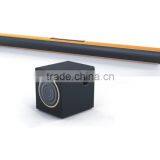
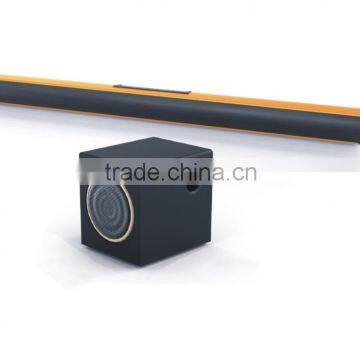
New Style Very Popular 2.1 tv Soundbar in 2016 Used Home Theater System

Related Products
-
 Aluminium Alloy Bluetooth Sound Bar Home Theater System Speaker With Deep Bass SoundbarUS$ 50 - 51MOQ: 100 Pieces
 -
2015 New Products Wireless Home Theater Music System SoundbarUS$ 50 - 51MOQ: 100 Pieces
-
Hot!2016 2.1 Channel Professional Home Theater/bluetooth Speaker/soundbar WITH SUBWOOFERUS$ 50 - 51MOQ: 100 Pieces
-
2.1 Bluetooth Soundbar High Quality 2.1 Bluetooth SoundbarUS$ 50 - 51MOQ: 100 Pieces
-
TV Speaker /Soundbar With Bluetooth/Bluetooth SpeakerUS$ 50 - 51MOQ: 100 Pieces
1.Parameters
| Brand Name | FOREVER |
| Model Number | FV-S01 |
| Name | Soundbar |
| Color | Black, Gold |
| Channel | 2.1 |
| Speaker Units | 2.25 ″ ×4 |
| Bass Unit | 5.25 ″ |
| Soundbar Net Weight | 2.2kg |
| Bass Net Weight | 3.7kg |
| Soundbar Size | 1000 ×84 ×73mm |
| Bass Size | 265 ×230 ×255mm |
| RMS | 20W ×2+30W |
| Resistance | 4Ω |
| Degree of Distortion | <0.1% |
| Frequency Response | 20Hz-20KHz |
| Power Adapter | DC19V 3.42A |
| Display | Yes |
| Button | No |
| Remote Control | Yes |
| Touch-based Input | Yes |
2. Features
(1)Aluminium alloy housing.
(2)3D surround technique is employed, make sound field wider.
(3)2.1 sound, bass deep and powerful.
(4)More choices of EQ, makes shock effects.
(5)Support optical fiber and coaxial audio input.
(6)Two sets 3.5mm AUX input.
(7)Wireless connect and play via Bluetooth.
(8)Touch panel+ remote control.
3.Operating Constructions
First connect the subwoofer, using speaker wire attached connect soundbar and subwoofer. Take one of the speaker wire end into the soundbar bass output interface; the other end connect to the subwoofer connetion clip. When the subwoofer installation is done.
Please use the 19V DC adapter to connect sound bar and switch on. It is starting up when digital display shows “H1”. The default state is AUX1 and digital display shows “RU1”. If need any other modes, please switch with the remote control or press button "SOURCE".
Aux Input: Connect sound and player by audio cable attached. This sound support 2 sets AUX input, AUX1 and AUX2. Choosing the AUX input you need by remote control or touch button "INPUT". The digital display shows "AU 1" when it is AUX1 input. The digital display shows "AU 2" when it is AUX2 input. Power of AUX1 is larger and suitable to switching in low signal voice frequancy.
Bluetooth mode: You can press "Bluetooth" button on remote control or use button "INPUT" to switch to the Bluetooth mode. The digital display shows "Bluetooth" and blink. Then turn on the bluetooth of mobil phone or some other equipments, search and pair "NS06". When pairing successfully, the digital display shows "Blutooth" and stop blinking. Then enjoy your music.
Optical Input: Please press "OPT" button on remote control or touch "INPUT" on the sound to switch to the optical input, the digital display shows "OP". You can use the optical function after connecting the optical cable.
Coaxial Input: Please press "COA" button on remote control or touch "INPUT" on the sound to switch to the coaxial input, the digital display shows "CO". You can use the coaxial function after connecting the coaxial cable.
U disk mode: Please insert U disk and this mode will instead of any other mode, the sound playing U disk music. You can move next, move previous, play, pause by pressing button or remote control button. If it in other mode, please press "AUX" button on remote control or touch "INPUT" to switch to U disk mode.
Operating Tips: Function of the "ST-BY" on remote control or button "POWER" of the sound is standby. When it is standby, the digital display shows "----". The initialized state of sound is AUX1 "AU 1", volume is 40 "U-40", bass volume is 40 "b-40", EQ state is "Eq1". After turning off and turn on again, number will be initialized and changed to default number.
When press MUTE button, digital display shows "U-00" and blink, the volume is 0. Press the MUTE button again shortly, the mute state will be relieved.
Installation: The sound can be wall-mounted or put on desk. There are two pieces of rubber blankets skid proof on the bottom of sound, can fix it well. For the wll-mounted type, you need mount the bracket which is in the accessories on the wall horizontally at a suitable height first. The space between center of two brackets should be 440mm. Please hang your stereo up after you install the brackets.
4.Product Pictures

Send Inquiry to This Supplier

You May Also Like
-
Credit Card Size RadioNegotiableMOQ: 1
-
Portable DAB and DAB+ Digital Radio With MP3 RadioNegotiableMOQ: 1 Piece
-
Portable& Rechargeable Mini Led TorchNegotiableMOQ: 500 Pieces
-
Work Site Radio USB Rechargeable DAB+, DAB, FM, Bluetooth, AUX Input | IP54 Waterproof Rugged Durable DesignUS$ 23.5MOQ: 3000 Units
-
BSG-328(new)Multifunction Solar Emergency Radio With Power Bank, Hand Crank, 4000/8000mAh Battery, SOS Alarm, Flashlight & IPhone 15 ChargingNegotiableMOQ: 1000 Pieces
-
Outdoor Emergency Disaster Prevention Radio, Hand Cranked Power Generation, Solar Power Bank, Compact, Portable, Multifunctional Mobile Power SupplyUS$ 17.5 - 17.9MOQ: 1000 Pieces
-
PTU7304AMFM Multi-channel Radio ReceiverNegotiableMOQ: 1 Unit
-
Phantom Bluetooth Speaker Alarm Clock Radio With Recording Function Charging AudioCNY 198 - 218MOQ: 5 Sets
-
Commercial Mixer AmplifierNegotiableMOQ: 1 Set
-
2014 New Style Dynamo Solar Powered Radio With Speaker and 3 Super-bright Led TorchNegotiableMOQ: 1000 Pieces


