








 Contact Platform Support
 Help Center
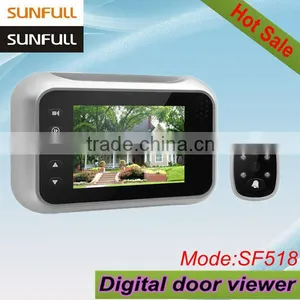
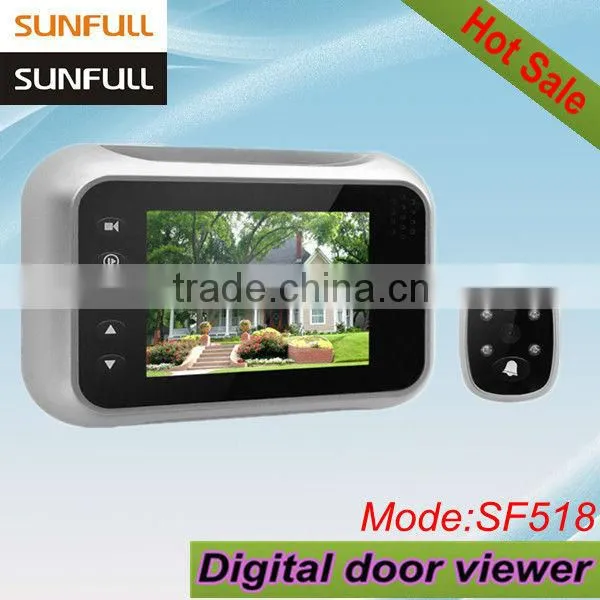
The Best Well-sold 3.5" Digital Video Peep Hole


Related Products
-
 2013 Hot Sale Video Peephole Door Camera/ Door Peep Hole Viewer With Bell,Visual,Nightvision,Automatic Detection,Leaving MessageNegotiableMOQ: 2 Sets
 -
3.5" Simple Viewing Function,cheapest, Video Door Phone KoreaUS$ 25 - 39MOQ: 100 Sets
-
2.8" LCD Apartment Video Phone Electronic Door LockNegotiableMOQ: 100 Sets
-
.com in Russian Colour Video Door ViewerUS$ 1 - 43MOQ: 10 Pieces
-
3.5 Inch LCD Clear Image Digital Photo ViewerUS$ 29 - 39MOQ: 100 Sets
Specifications
Digital Video Peep hole3.5" LCD,0.3MP color lens
Doorbell,video recording
Photo shooting,1-32G micro SD
4pcs IR LEDs
Specification of Digital Video Peep hole
This model is designed and manufactured by our company Shenzhen Sunfull Technology Co., Ltd (UNITECOM CO., LIMITED). This product make people's lives more convenient and more safer.
Its main feature as follows:
Display |
3.5 inch TFT LCD screen |
Sensor |
0.3MP high definition colorful sensor, 120° wide angle lens |
Doorbell |
Doorbell function, 32 types ringtone for choosing |
Micro SD |
Support external micro SD up to 32G |
Don't Disturb |
The doorbell won't ring when this function is enable |
Infrared |
4pcs IR LEDs, clear night vision |
Zoom |
3x digital zoom |
Photo Taking |
Automatically taking and saving photos on micro SD, |
Video Recording |
Press " |
Review |
Press " |
Menu Setting |
Press " |
Language |
Support 8 languages |
Power |
DC adapter and 4pcs AA batteries are optional |
Date and Time |
yy/mm/dd, mm/dd/yy, dd/mm/yy mode |
Low Voltage |
Power icon will twinkle when battery voltage is low |
Barrel Diameter |
14-22mm |
Door Thickness |
35-90mm |
Product Size |
138x76x23mm |
For you to learn how to operate this digital peephole viewer, I attach its picture and operation instruction as follows:
- When visitor press "" button, indoor host device will ring "Ding Dong" and screen will be turn on automatically, indoor user can see who is outside the door
- Indoor user press "" button, the screen will turn on and show outdoor environment, at this time you can press " " button again to snap a outdoor photo
- The digital peephole viewer will automatically take and save photo to micro SD card when visitor press the doorbell button, the photos will be marked with date and time.
- Press "" button, device will record and save video to micro SD card, to stop the recording anytime if you re-press " " or " " button
- User can review recorded photos and video on digital peephole viewer directly by pressing "" button, and press "" or "" button to view previous ones or next ones. If you choose a video, when you pressing " POWER " button, the video will play.
- Under " REVIEW " mode, user can delete photo or video on DPV directly by pressing "" button.
- Press "MENU" button to enter to menu settings
- In standby status, pressing "UP" for zoom in, pressing "DWN" for zoom out.
It is very easy to install the product to your door. You only need to screw up 2 bolts. For you to learn how to install the product, I attached pictures as follows:
Our SF518 has siver / champagne color for choosing!!!

Send Inquiry to This Supplier

You May Also Like
-
Door PeepholeNegotiableMOQ: 2000 Pieces
-
Brass Door ViewerNegotiableMOQ: 1
-
Mini 1/4" CMOS Sensor Surveillance CCTV Door Eye Camera Wireless Hole Security Color Camera/door Eye ViewerUS$ 11.97 - 11.97MOQ: 100 Units
-
180 WIDE ANGLE D PEEPHOLE SPYHOLE CHROME BRASS 35-55MM DOORSUS$ 0.4 - 1.5MOQ: 1500 Pieces
-
Door ViewerNegotiableMOQ: 1000 Pieces
-
180 Degree Digital Door ViewerUS$ 0.28 - 0.393MOQ: 1000 Pieces
-
Door ViewersNegotiableMOQ: 1
-
Invisible 200 Degree Brass Door Viewer Peep-holes for Doors Door Mirror Made in ChinaNegotiableMOQ: 1000 Pieces
-
180 Degree Door Viewer(Zinc or Brass)NegotiableMOQ: 1000 Pieces
-
Home Security Remote Unlock 2.4GHz Video Wireless Digital Door ViewerUS$ 1 - 85.27MOQ: 1 Set


