








 Contact Platform Support
 Help Center
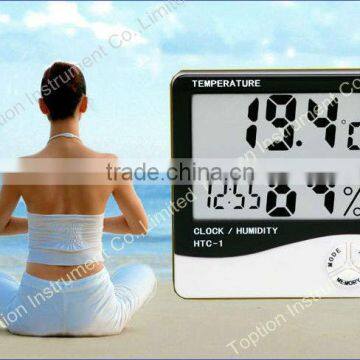
HTC-1 Temperature and Humidity Meter (digital Display)

Related Products
-
 Microporous Membrane FilterUS$ 1 - 40MOQ: 1000 Pieces
 -
HTC-1 Digital Thermometer & Hygrometer/ HygrothermographUS$ 1 - 30MOQ: 100 Pieces
-
10 ml Centrifuge TubeNegotiableMOQ: 5000 Pieces
-
Clock / Humidity / Temperature Meter / Hygrothermograph HTC-1US$ 1 - 30MOQ: 100 Pieces
-
HTC-1 Digital Thermohygrograph With ClockclockUS$ 1 - 30MOQ: 100 Pieces
Specifications
HTC-1 Temperature and Humidity Meter (digital display)Temp Measuring Range: -50~ +70C
Humidity Range: 10%RH ~ 99%RH
HTC-1 Temperature and Humidity Meter (digital display)
Product Specification of HTC-1 Temperature and Humidity Meter (digital display)
1. Temperature Measuring Range: -50°C~ +70°C(-58°F~ +158°F)
2. Temperature Measuring Accuracy: ±1°C(1.8°F)
3. Temperature Resolution: 0.1°C(0.2°F)
4. Humidity Measuring Range: 10%RH ~ 99%RH
5. Humidity Measuring Accuracy: ±5%RH
6. Humidity Resolution: 1%
7. Battery: AAA 1.5V
8. Size: 98*106*22mm
Basic Function of HTC-1 Temperature and Humidity Meter (digital display)
Temperature / Humidity Display
°C/°FTemperature Switch Display
Maximum / Minimum Temperature and Humidity Memory Function
12 / 24 Hourly Clock
Hourly Chime Function
Daily Alarm Function
Calendar Display Function
Operation Method of HTC-1 Temperature and Humidity Meter (digital display)
1. Burst through battery door according to indicated direction in product back and take out separator, and then put this battery door in back. This product just can be used.
2. Key Function: [MODE] is to switch clock and alarm clock display modes and set current time, alarm time, 12 or 24 hourly system and date; [ADJ] is to adjust values of set items; [MEMORY] is to display maximum & minimum humidity and temperature values in memory, and remove memorized maximum & minimum temperature and humidity values; [°C/°F] is to switch temperature unit to display temperature in°C(degree Celsius) or in°F(degree Fahrenheit); [RESET] is to remove all set / memorized values, and get back original state.
3. Under original state, press [MODE] key for 2 seconds to make minute value in current time begin to twinkle, and press [ADJ] key to adjust minute number, and continuously press [MODE] key to respectively set “Clock”, “12/24”, “Month (M)” and “Day (D)”.
4. Under current clock mode (two points between clock and minute twinkle one time per minute), press [MODE] one time to switch display as clock mode (two points between clock and minute don’t twinkle), and now press [ADJ] key to switch on and off of “Quarter Bell” function / “Hourly Chime” (Alarm) function. Press [MODE] key for another two seconds to set alarm time, and meanwhile, start “Hourly Chime” function, sign”(Alarm)appears.
5. Under alarm clock mode, automatically get back current clock in one minute in case of no any operation, and press [ADJ] key one time to switch to calendar display, and automatically return to current clock after three seconds; press MAX / MIN key to display maximum value of temperature / humidity since last clear (CLEAR).
6. Press [MEMORY] key to display memorized maximum (MAX) and minimum (MIN) values of temperature / humidity, and press [MEMORY] key for more than two seconds to clear memorized maximum / minimum value.
Back part of HTC-1 Temperature and Humidity Meter (digital display)
About the circuit board of HTC-1 Temperature and Humidity Meter (digital display)

Send Inquiry to This Supplier

You May Also Like
-
Hst Digital Raw Material Moisture Analyzer MeterNegotiableMOQ: 1
-
Halogen Moisture Meter for DoughUS$ 700 - 1,000MOQ: 1 Piece
-
Multifunctional Garden Soil pH MeterUS$ 2 - 3MOQ: 1000 Pieces
-
Egg Incubator Temperature Humidity ControllerNegotiableMOQ: 50 Pieces
-
Water Indication Label/Moisture, Dew Detection Label/Single UseUS$ 10 - 20MOQ: 40 Cases
-
SELON DIGITAL MOISTURE ANALYZER, INFRARED MOISTURE ANALYZER, HALOGEN MOISTURE ANALYZERNegotiableMOQ: 2 Sets
-
Paddy Rice Moisture MeterUS$ 67.09 - 74.55MOQ: 20 Sets
-
Grain Moisture Meter - Single Kernel TypeNegotiableMOQ: 1 Unit
-
Wood Moisture MeterNegotiableMOQ: 1 Piece
-
3 IN 1 PLANT FOLOWER SOIL TESTER MOISTURE LIGHT PH METERNegotiableMOQ: 500 Pieces


