








 Contact Platform Support
 Help Center
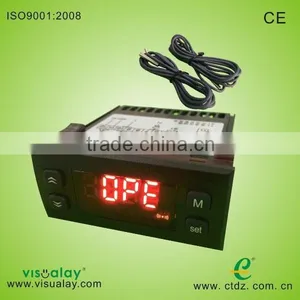
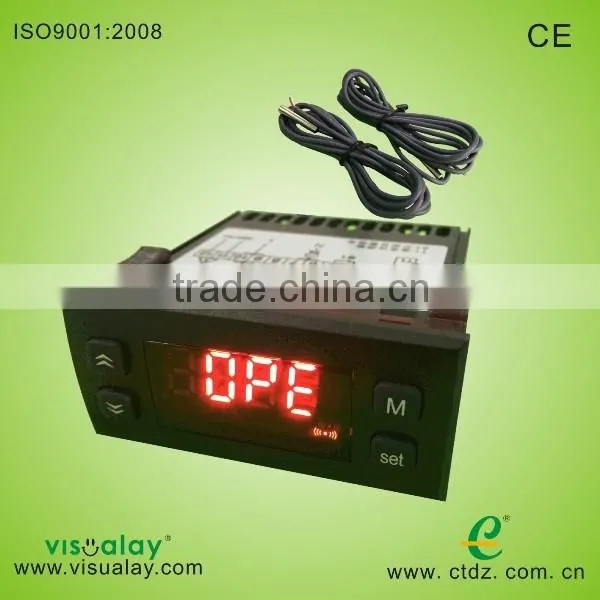
Digital Two Stage Temperature Controller D20

Related Products
-
 Multi-functional 4 Stage Temperature Controller E40US$ 20.5 - 22MOQ: 5 Sets
 -
Immersion 3 Stage Thermostats E30US$ 19.5 - 22MOQ: 10 Pieces
-
Immersion 3 Stage Temperature Controller E30US$ 18.5 - 22MOQ: 10 Pieces
-
3 Stage of Monitor Temperature Controller E30US$ 18 - 22MOQ: 1 Piece
-
Immersion 3 Stage Password Temperature Controller E30US$ 19 - 23MOQ: 1 Piece
Specifications
Temperature ControllerProduct Size:7X3.5X7.5CM
Bore Size:70X29MM
Main function
Refrigeration Defrost fan control alarm
D20 User Guide (V5.00)
Main Function
Temperature display, temperature controlling(refrigeration/heat mode can be set),compressor start delay protection, 2 defrost modes (electric heat, hot gas), 2 defrost start mode (time alternation, accumulative compressor running time), 2 defrost end mode (timing, controlled by both temperature and time), dripping, manual defrost, sensor error alarm, one external alarm input, password, C/F unit change.
Technique Index
1,Temperature display range: -50~150°C(The resolution is 0.1°C)
-58~302°F(The resolution is 0.1°F)
2,Power supply: AC 220V±10% or AC 380V±10% 50Hz (Refer to the wiring diagram)
3,Operating environment: temperature -10°C~50°C, humidity≤85%
4,Relay contact capability: compressor 20A/250VAC, defrost 8A/250VAC (pure resistive load)
5,Temperature sensor: NTC R25=5kΩ, B (25/50) =3470K
Operating Guide
1,Meaning of the index lights on the panel
Index light |
Name |
Light |
Flash |
Temp setting |
In the state of temp setting |
- |
|
Refrigeration |
Refrigerating |
Ready to refrigerate, in the state of compressor start delay protection |
|
Heat |
Heating |
Ready to heat, in the state of compressor start delay protection |
|
Defrost |
Defrosting |
Dripping or the state of compressor start delay protection |
|
- |
- |
- |
|
Alarm |
- |
Alarm state |
2,Meaning of the LED display
The LED usually shows temperature, if it shows “SHr”, it means the temperature sensor is short, and “OPE” means the temperature sensor is open. The temperature and the alarm code (Axx) will show alternately when in the alarm state. The code is showing below:
Code |
Meaning |
Explanation |
A11 |
External alarm |
Alarm from external alarm signal, refer to the internal parameter code “F50” |
A21 |
Temperature sensor error |
Open or short(showing “OPE” or “SHr”) |
A22 |
Evaporator sensor error |
Open or short(showing “OPE” or “SHr” when press the key “6”). If you don’t need to use the evaporator sensor, you can use the F59 to close the alarm. |
3,The temperature of the evaporator sensor display
When displaying current temperature, press “6” key, the controller will display defrosting temperature. Loose “6” key, then return to current temperature. Notice that if you press the key and hold it for 5 seconds, the controller will enter or exit the defrosting state forcibly.
4,Set temperature
Press the key “S” for at least 2 seconds, then enter the state of temperature setting, the LED displays the setting temperature, then using “5” key or “6” key can change the parameter(the key “5” adds 0.1°C, the key “6” minuses 0.1°C, press and hold it over 0.5 seconds can add or minus rapidly). After setting, press “S” again, then exit the state of parameter setting. Pressing the key “M” in the setting process means cancel and exit, but the setting value will not be saved.
5,Refrigerate (or heat) forcibly
When displaying current temperature, the temperature is between “setting temperature - temperature difference” and “setting temperature + temperature difference”, the system may or not refrigerate, you press the key “5” and hold it for 5 seconds, the controller will enter the refrigeration state forcibly when in the refrigeration mode, and stop refrigeration when the temperature is below “setting temperature – temperature difference”; the controller will enter the heat state forcibly when in the heat state, and stop heating when the temperature is above “setting temperature + temperature difference”.
6,Defrost manually
When in the state of displaying current temperature, press the key “6” and hold it at least 5 seconds, then the controller enters the defrosting state. In defrosting state, press the key “6”and hold it at least 5 seconds again, this can finish the defrosting forcibly.
7,Advanced operation
Press the key “M” and hold it for 5 seconds, and if you have set the password, the LED display the “PASS” to hint you to enter the password, you can use the key “5” and “6” to enter the password, if the password is correct, the LED will display the parameter code, use “5” or “6” to select the parameter code, pressing the “S” key can make it to show the value of the parameter after select the parameter, you use “5” or “6” to set the parameter, then press the “S” key to return the state of showing parameter code after finishing setting. Pressing the key “M” can exit the parameter setting state when display the parameter code, pressing the key “M” means cancel when in the process of setting parameter, and the parameter will not be changed. Internal

Send Inquiry to This Supplier

You May Also Like
-
YOKOGAWA EJX210A Pressure Transmitter for HVAC System Airflow MeasurementNegotiableMOQ: 1 Piece
-
River Flow Measurement Ultrasonic Open Channel Flow MeterNegotiableMOQ: 100 Units
-
221824054 Heavy Duty Truck Sensor Parts Fuel Tank Level Sensor For DAFNegotiableMOQ: 1
-
Water Level Gauge UHZ-99A Magnetic Water Level Gauge RS485US$ 149 - 499MOQ: 1 Piece
-
50CM Aluminum Levels (0.7-1 mm THICKNESSUS$ 1 - 30MOQ: 600 Pieces
-
Aluminium Spirit Level in Stock,Levelling Instrument Measure Toolsin Stock,high Quality Spirit Level in Stock SL0001US$ 3.2 - 4.5MOQ: 500 Pieces
-
Gsm Modbus Rtu for M2M Gsm Gprs Monitor M3G6 Data LoggerUS$ 80 - 150MOQ: 1 Piece
-
Liquid Level Float Switch/ Pull-in Type Water Float SwitchUS$ 6.5 - 8.1MOQ: 20 Pieces
-
DMI820 Digital Output Inclinometer/TIlt Sensor/TIlt Meter With 2.8" Touch Screen High Accuracy0.003 Within Full Measuring RangeNegotiableMOQ: 1 Piece
-
Submersible 4-20ma Level TransmitterUS$ 80 - 200MOQ: 1 Unit


