








 Contact Platform Support
 Help Center
Home > Computer Products > Speaker & Sound Box > Wireless Speaker > NEW 150m HDMI Extender With Remote IR by Single CAT5e/6 Cable
NEW 150m HDMI Extender With Remote IR by Single CAT5e/6 Cable
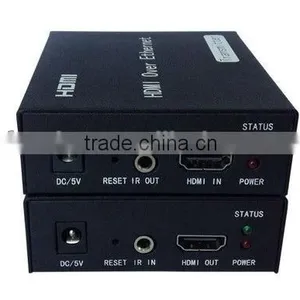
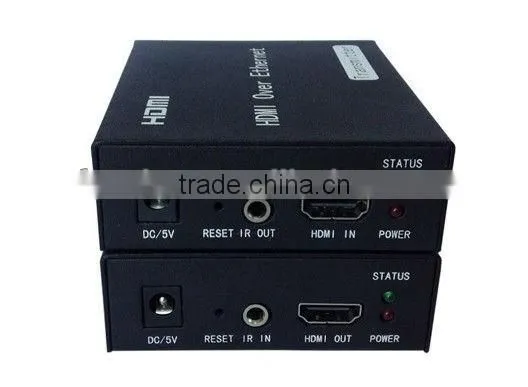
Negotiable
MOQ: 1 Set (Price negotiable depending on order volume and customization)
Key Specifications
Get Latest Price
Place of Origin:
Guangdong, China
Brand Name:
Fundar
Model Number:
DT-100
Payment & Shipping
Payment Methods:

Port of Shipment:
China
Delivery Detail:
Delivery time depends on order quantity.
Related Products
-
 NEW 150m Rj45 HDMI Extender With Remote IR by Single CAT5e/6 CableNegotiableMOQ: 1 Set
 -
NEW 60m Rj45 HDMI Extender With Remote IR by Single CAT5e/6 CableNegotiableMOQ: 1 Set
-
HDMI Extender by Single CAT5e/6 Cable: 60m, Transimitter+ReceiverNegotiableMOQ: 1 Set
-
New 60m 3D HDMI Extender With Remote IR by Double CAT5e/6 Cable, Transimitter+ReceiverNegotiableMOQ: 1 Set
-
New 60m 3D HDMI Repeater With Remote IR by Double CAT5e/6 Cable, Transimitter+ReceiverNegotiableMOQ: 1 Set
Place of Origin
Guangdong, China
Brand Name
Fundar
Model Number
DT-100
Specifications
1.NEW 150m HDMI Extender with Remote IR by Single CAT5e/6 Cable2.Support HDMI1.3 protocol
NEW 150m HDMI Extender with Remote IR by Single CAT5e/6 Cable
1.Introduction
HDMI Over Ethernet is based on TCP/IP standard. It transmit your HD display with the high resolutions up to 395 feet (120 meters) away from your HDMI or DVI-D source by using one CAT5e/6 cable. With the advantage of TCP/IP standard,you can extend your HD video to multiple displays by using an Ethernet Switch.
2.Specifications
Ø Following TCP/IP standard.
Ø Support HDMI1.3 protocol.
Ø HDCP1.1 & 1.2 protocol compliant
Ø Support point-to-point mode, one point-to-many mode and cascade connection mode.
Ø Support IR extender function allows IR remote control of Source devices from remote viewing location by sending IR commands received in the vicinity of the Display back to the Source devices.
HDTV Resolutions |
480p,576p,720p,1080p |
Audio |
Sample rate:32kHz, 44.1kHz and 48kHz |
IR remote control |
38KHz; NEC |
HDMI |
HDMI 1.3 |
HDCP |
HDMI 1.2 |
Power adapter |
Input: 100V - 240V (50 - 60Hz) Output: 5V/1A |
Power consumption |
HDMI Sender: 3W HDMI Receiver: 3W |
Size(L-W-H) |
100×60×25mm |
Weight |
128g*2PCS |
Operating Temperature/Humidity |
0°C - 70°C / 10% - 80%RH(no condensation) |
Storage Temperature/Humidity |
-10°C - 80°C/ 5% -90% RH(no condensation) |
3.PACKAGE CONTENTS
Before attempting to use this unit, please check the packaging and make sure the
following items are contained in the shipping carton:
1) Main unit No. 1 Sender , Main unit No. 2 Receiver
2) Two pieces of 5V DC Power Supply.
3) a pieces of IR transmitter and a pieces of IR receiver
4) User’s Manual
4.Panel Descriptions
HDMI Sender
5V/1A |
Supply power for the Sender |
RESET |
Hold down the key for 10 seconds, the model will Restore the default setting |
IR-OUT |
Connect IR transmitter to this Port. |
HDMI - IN |
Connect HDMI Source to this Port. |
STATUS |
When system start up, the Green LED will be on,When transmit video, the led will blink. |
Power |
Power on, The Red led is on |
HDMI Receiver
5V/1A |
Supply power for the Receiver |
RESET |
Hold down the key for 10 seconds, the model will Restore the default setting |
IR-IN |
Connect IR receiver to this Port. |
HDMI - Out |
Connect HDMI sink device to this Port. |
STATUS |
When system start up, the Green LED will be on,When transmit video, the led will blink. |
Power |
Power on, The Red led is on |
5.Connection and operation
1) Connect the HDMI source (such as DVD, PS3, STB ) to the HDMI IN of Sender.
2) Connect the IR sender to the Sender IR OUT Port, and Be Directed at HDMI video source’s IR receiver.
3) Connect the HDMI out of Receiver to HDTV display.
4) Connect the IR receiver to the Receiver IR IN Port.
5) Use one Cat5e/6 cable up to 120m to connect the Sender and Receiver.
6) Plug two pieces of 5V power supply into the Sender and Receiver.
7) Power on the HDTV display and HDMI source.
6.Application diagram

Send Inquiry to This Supplier


6Yrs
Business Type
Manufacturer, Distributor/Wholesaler
Year Established
2011
Factory Size
Below 1,000 square meters
Total Employees
101 - 200 People
You May Also Like
-
HDMI Switch & Splitter VK2-0034NegotiableMOQ: 500 Pieces
-
Hot Sell Carbon Microphone TransmitterUS$ 0.1 - 1.1MOQ: 1000 Pieces
-
TV Plug 9.5mm PlugUS$ 0.1 - 10MOQ: 1 Piece
-
TV Boxes(GF-TB-3600)NegotiableMOQ: 1 Piece
-
15.4-inch Display Portable Outdoor Party SpeakerNegotiableMOQ: 100 Cartons
-
Manufacturer Silicone Button Silicone Keyboard Wholesale Product Custom Made DesignUS$ 0.05 - 0.1MOQ: 500 Pieces
-
2013 Newest Hot Selling With RTL2832+R820T Chipset DVB-T TV TunerUS$ 6 - 9MOQ: 100 Pieces
-
Indoor tv Signal Amplifier(IA-6112S)US$ 10 - 50MOQ: 500 Pieces
-
X Square-Single Lnb,Twin Lnb and Quad LnbUS$ 1.4 - 4.5MOQ: 3000 Pieces
-
Best Selling Voxlink Digital AV Adapter With HDMI And VGA+Audio Dual Display Converter PowerUS$ 23.5 - 24MOQ: 10 Pieces


